This public guide is adapted from the DBRecover for Oracle C6 GUI validation manual. File paths are examples, and the C6X260516 schema is used as a reference dataset to demonstrate repeatable Oracle recovery workflows.
1. Scope and Operating Model
C6X260516 is a reference validation schema rather than a small training dataset. It is designed to exercise the same GUI recovery paths customers use in real Oracle incidents. A useful walkthrough verifies that DBRecover unloads real data, not just object names.
The C6 package contains two layers:
| Layer | Prefix | Purpose | Current C6 gate |
|---|---|---|---|
| Inherited baseline | C5_% | High object count and broad data-type surface inherited from C5X20. | inherited_c5_table_count = 347 |
| Guide scenarios | C6_% | Concrete GUI user-guide scenarios with row counts, sums, LOB byte lengths, and artifact manifests. | c6_scenario_manifest_count = 21 |
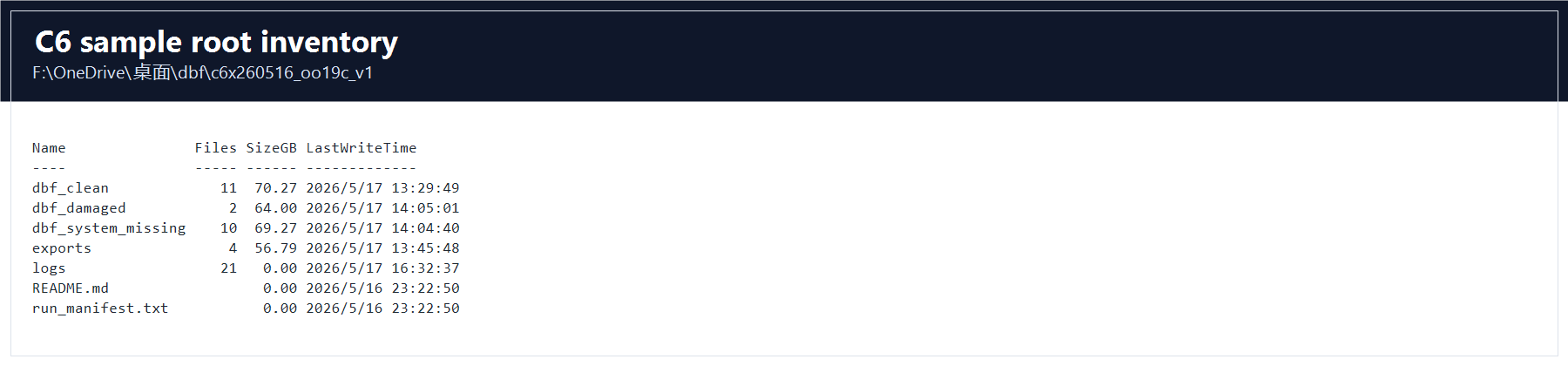
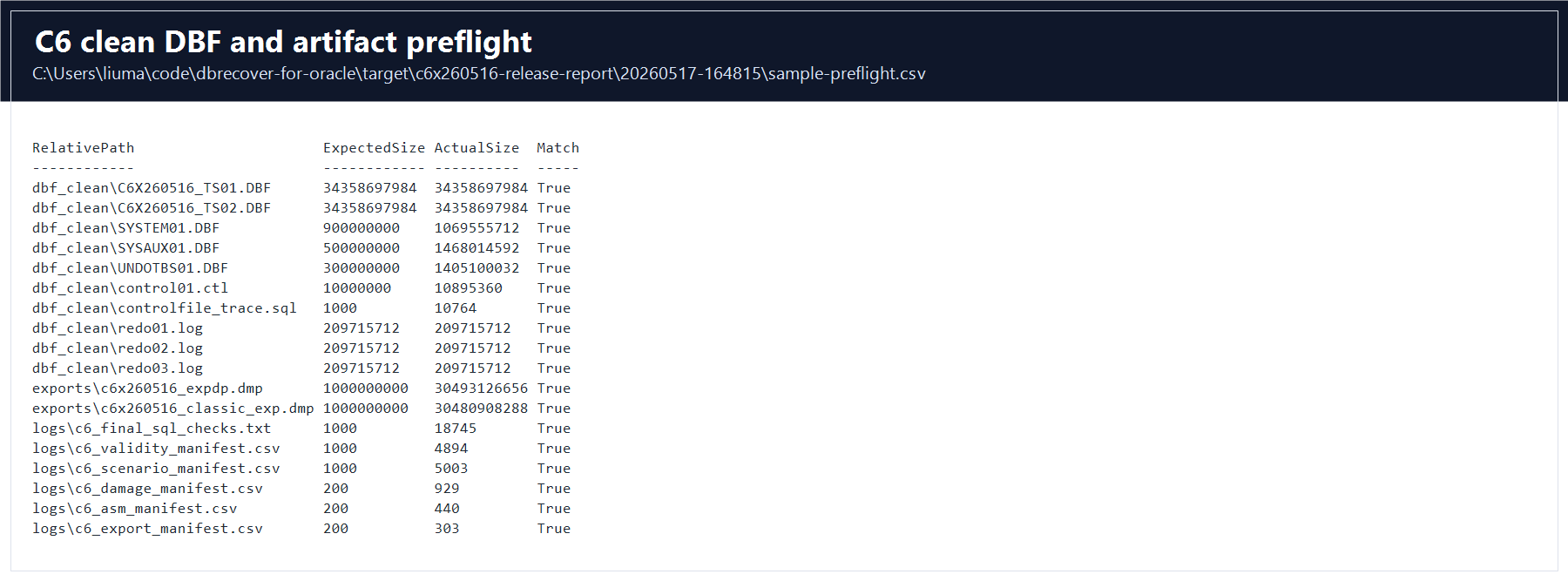
34,358,697,984 bytes each, and the required SYSTEM, SYSAUX, UNDO, redo, dump, and manifest files are present.Current validated state
| Sample root | D:\dbrecover-samples\c6x260516_oo19c_v1 |
| Full report | target\c6x260516-validation-report\full-run |
| Validation result | Tests run: 9, Failures: 0, Errors: 0, Skipped: 0; Maven result BUILD SUCCESS. |
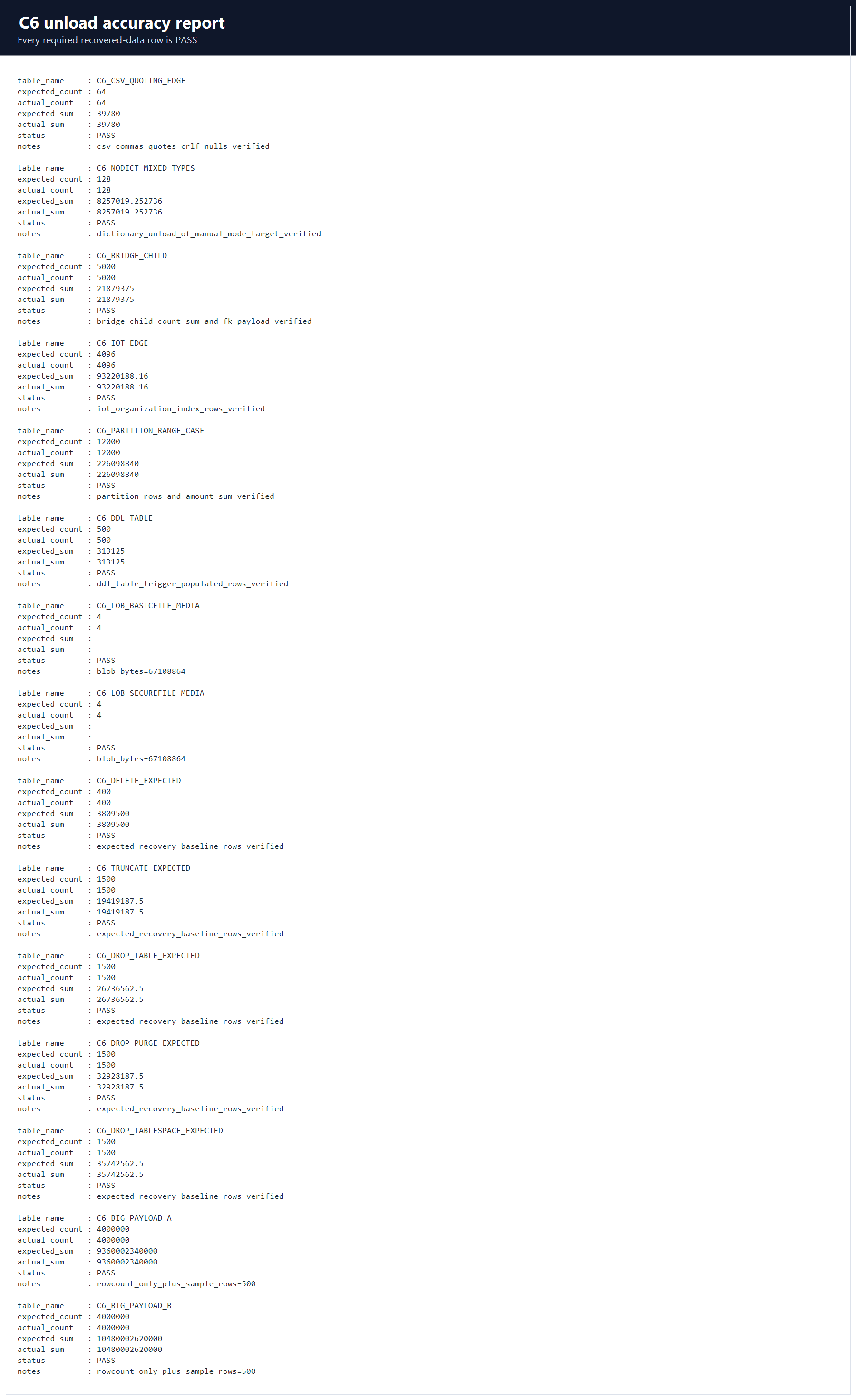
| Data accuracy | logs\c6_unload_accuracy_report.csv contains 15 required rows and every row is PASS. |
| Screenshot model | GUI screenshots show DBRecover operations; C6 evidence screenshots show the exact local sample, reports, manifests, and validation outputs used for this guide. |
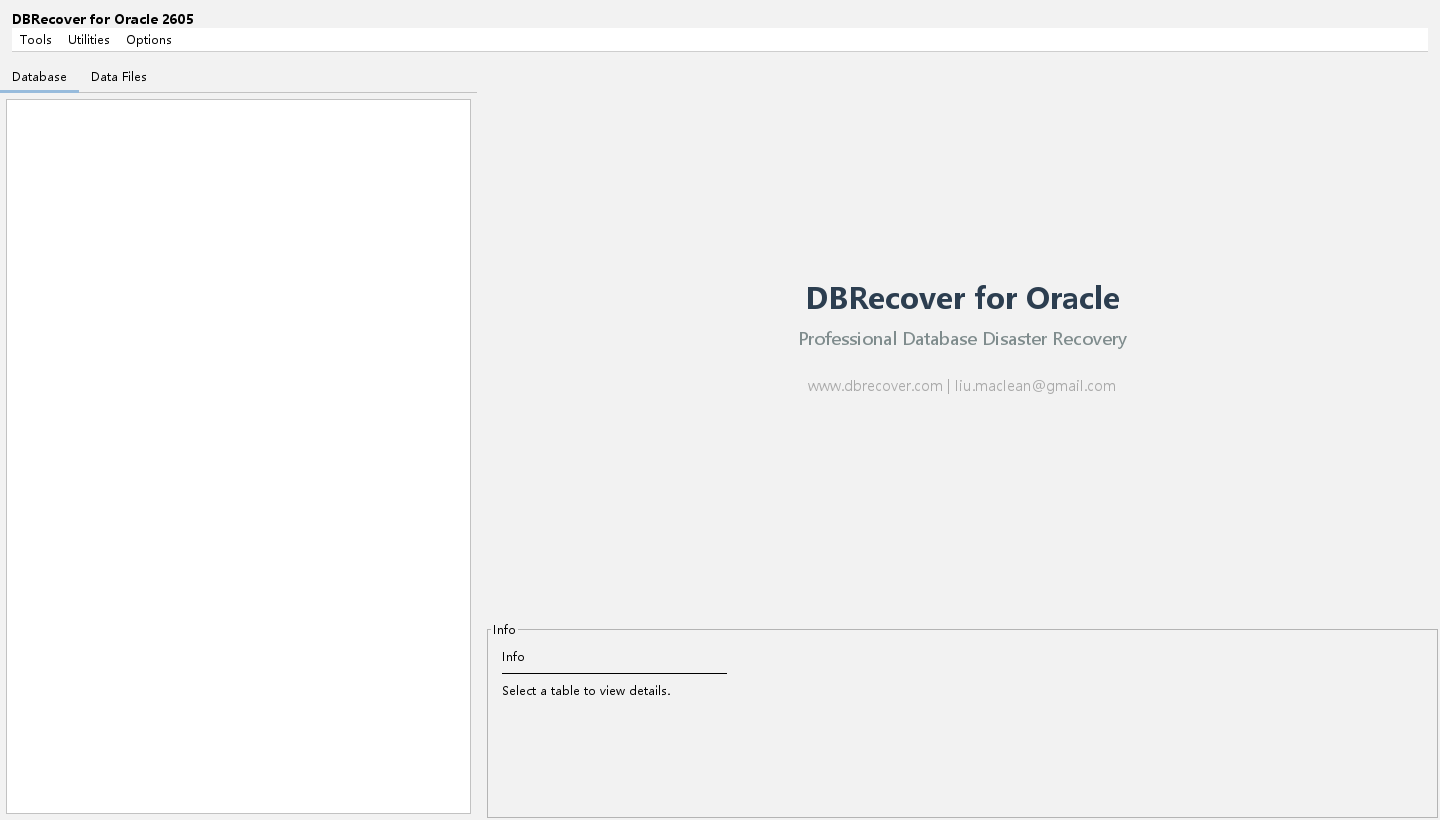
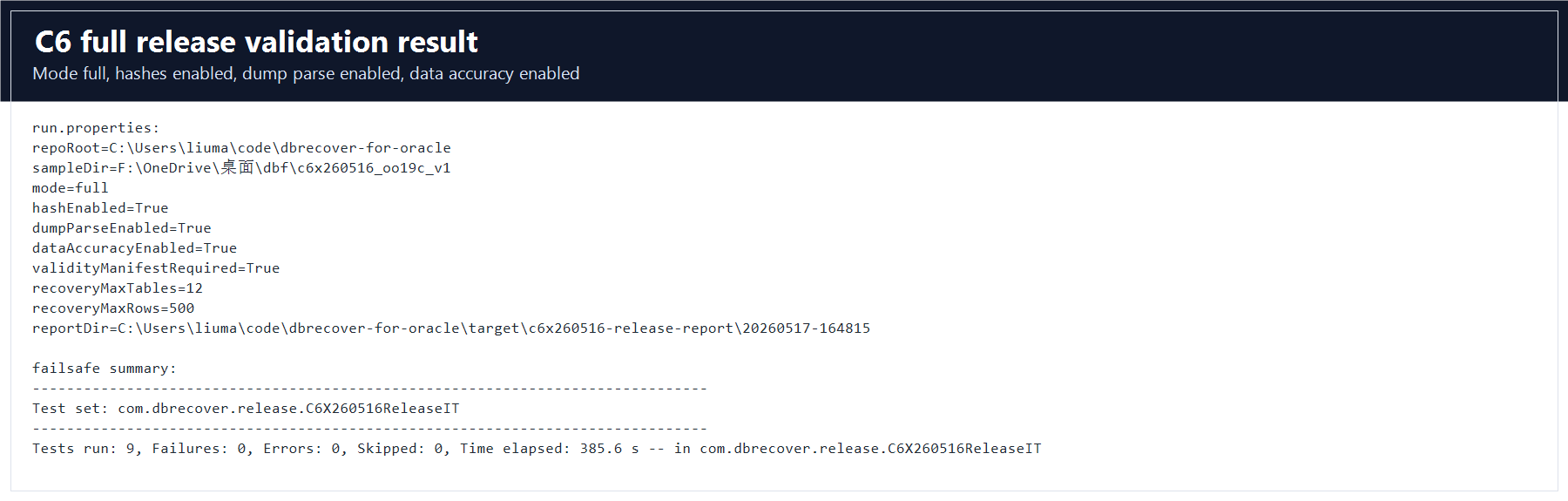
Official-guide coverage target
This C6 guide follows the same customer-facing scope as the public DBRecover for Oracle user guide: installation and startup, license registration, recovery wizard loading, dictionary and no-dictionary workflows, CSV export, Data Bridge, DDL export, diagnostics, Dump Reader, ASM file handling, and real-world recovery scenarios for corruption, missing SYSTEM, ransomware or damaged files, DELETE, TRUNCATE, DROP TABLE, and DROP TABLESPACE.
| Official guide area | C6 section in this manual | Evidence used |
|---|---|---|
| Installation, startup, registration | Sections 3 and 18 | GUI menu screenshots and log/troubleshooting checks. |
| Normal dictionary-mode recovery | Sections 4 and 5 | Clean DBF preflight, SYSTEM/SYSAUX/UNDO, C6 schema object surface. |
| CSV export and unload correctness | Section 6 | C6_CSV_QUOTING_EDGE, partitioned table, IOT, large payload tables. |
| LOB recovery | Section 7 | BasicFile and SecureFile 64 MB BLOB byte proof. |
| Human-error recovery | Section 8 | DELETE, TRUNCATE, DROP, DROP PURGE, DROP TABLESPACE expected baselines. |
| No-SYSTEM and damaged-file cases | Sections 9 and 10 | Dedicated no-SYSTEM and damaged DBF file sets. |
| ASM, DMP, DDL, Data Bridge | Sections 11 through 14 | ASM manifest, two dump formats, DDL object surface, bridge count/sum checks. |
2. C6 Sample Inventory
In this walkthrough, the C6 sample directory is shown as:
D:\dbrecover-samples\c6x260516_oo19c_v1The sample was generated on Oracle 19c OO19C with schema C6X260516 and tablespace C6X260516_TS.
Required directory layout
| Directory | Files | Size on this PC | Purpose |
|---|---|---|---|
dbf_clean\ | 11 | 70.27 GB | Clean cold-copy DBFs, control file, controlfile trace, and redo logs. |
dbf_system_missing\ | 10 | 69.27 GB | No-SYSTEM test set. It intentionally omits SYSTEM01.DBF. |
dbf_damaged\ | 2 | 64.00 GB | Copied DBFs with controlled header and LOB-block damage. |
exports\ | 4 | 56.79 GB | expdp and classic exp dump files and logs. |
logs\ | 20 | Small | Manifests, SHA256 verification, LOB extent map, and validation reports. |
Clean DBF files
| File | Observed size | Why it is needed |
|---|---|---|
dbf_clean\C6X260516_TS01.DBF | 34,358,697,984 bytes | First C6 application datafile. Contains guide objects and part of the large payload. |
dbf_clean\C6X260516_TS02.DBF | 34,358,697,984 bytes | Second C6 application datafile. Contains guide objects, LOB extents, and part of the large payload. |
dbf_clean\C6X260516_DROP_TS01.DBF | 2,147,491,840 bytes | Retained datafile from the dropped-tablespace scenario. |
dbf_clean\SYSTEM01.DBF | 1,069,555,712 bytes | Oracle dictionary source for normal dictionary-mode recovery. |
dbf_clean\SYSAUX01.DBF | 1,468,014,592 bytes | Auxiliary dictionary and metadata. |
dbf_clean\UNDOTBS01.DBF | 1,405,100,032 bytes | Undo tablespace copy. |
dbf_clean\control01.ctl | 10,895,360 bytes | Copied control file for reference. |
dbf_clean\controlfile_trace.sql | 10,764 bytes | Human-readable file and control-file reference. |
dbf_clean\redo01.log, redo02.log, redo03.log | 209,715,712 bytes each | Redo files copied with the clean sample. |
Dump files
| File | Observed size | Use in this guide |
|---|---|---|
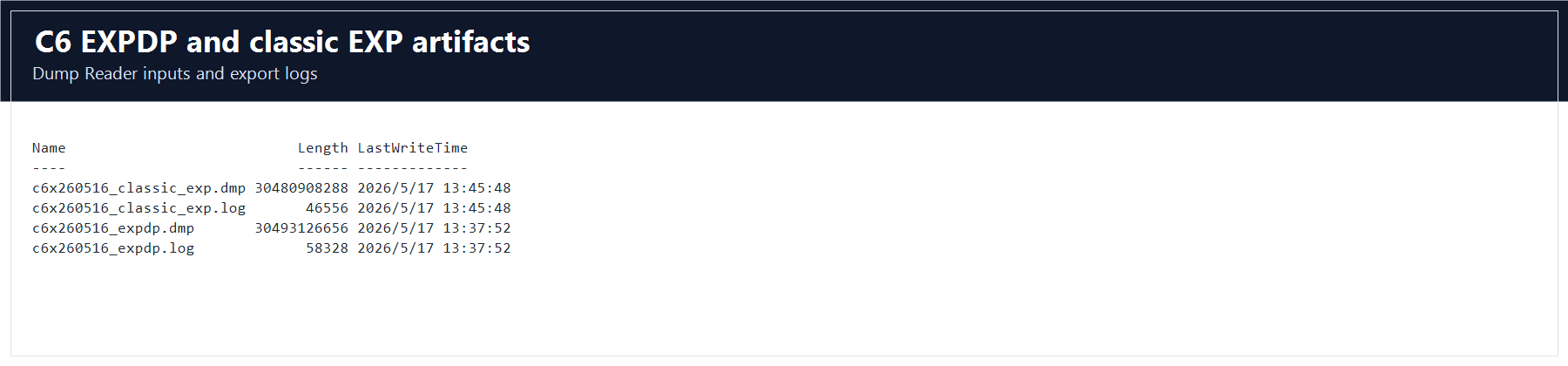
exports\c6x260516_expdp.dmp | 30,493,126,656 bytes | Data Pump dump reader workflow. |
exports\c6x260516_classic_exp.dmp | 30,480,908,288 bytes | Classic exp dump reader workflow. |
exports\c6x260516_expdp.log | 58,328 bytes | Data Pump export log. |
exports\c6x260516_classic_exp.log | 46,556 bytes | Classic exp export log. |
Manifest and proof files
| File | Purpose |
|---|---|
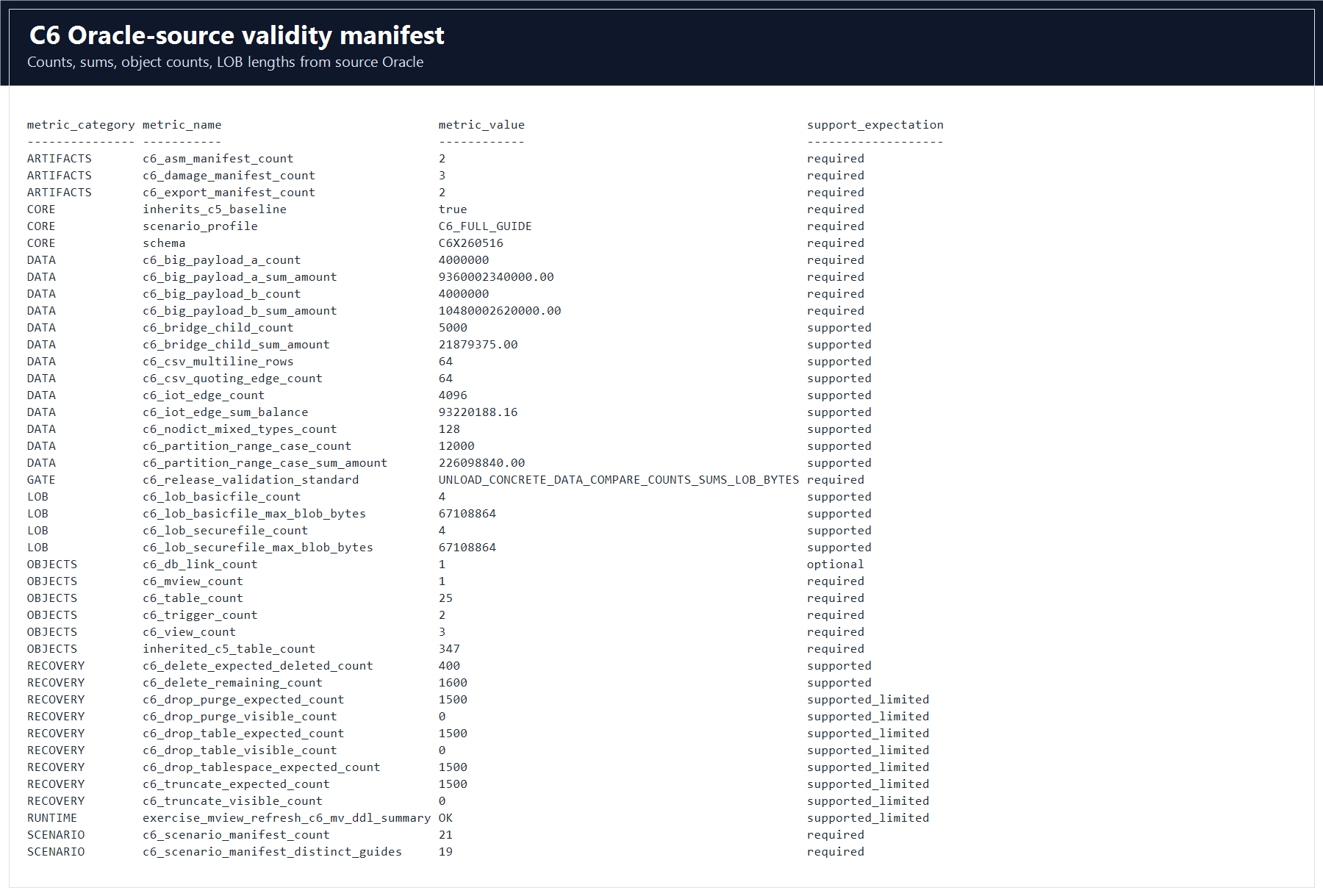
logs\c6_validity_manifest.csv | Authoritative counts, sums, LOB lengths, and object gates exported from Oracle. |
logs\c6_scenario_manifest.csv | The 21 scenario rows that this guide must cover. |
logs\c6_damage_manifest.csv | Defines the damaged and no-SYSTEM file sets. |
logs\c6_asm_manifest.csv | Maps ASM-style aliases to copied local DBFs. |
logs\c6_export_manifest.csv | Records required expdp and classic exp artifacts. |
logs\c6_lob_extent_map.csv | Maps C6 LOB segments to extents and file blocks for damage validation. |
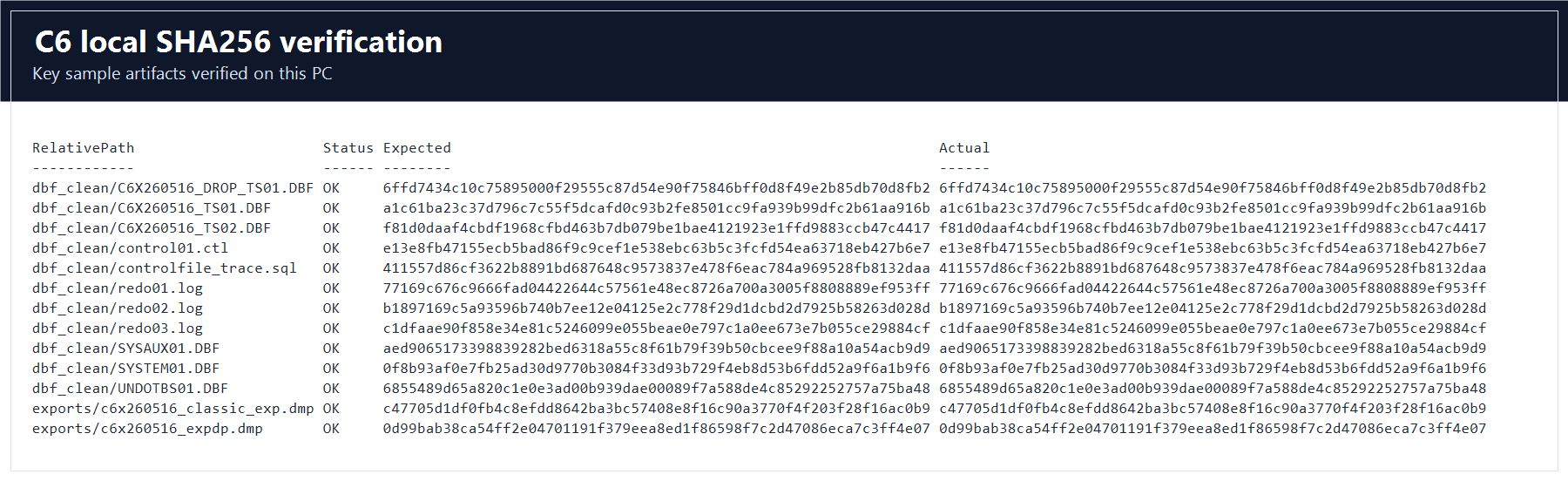
logs\c6_local_sha256_verify.csv | SHA256 verification record for the reference package. The validated set records 13 key files as OK. |
logs\c6_unload_accuracy_report.csv | Generated by full validation after DBRecover unloads C6 tables. Used for validation sign-off. |
3. Install and Start DBRecover
DBRecover for Oracle is portable software. Customer packages include launch scripts for the target platform. Development helper scripts are not part of the customer workflow.
Windows startup
- Unzip the DBRecover package to a local directory, for example
D:\DBRecover\dbrecover-for-oracle-2605. - Open the unzipped directory.
- Double-click
dbrecover.bat. - If Windows blocks the package, unblock the ZIP before extracting or allow the signed package according to your endpoint policy.
- For large C6 testing, add the DBRecover program directory and the C6 sample directory to antivirus exclusions if your security policy allows it.
Linux startup
- Unzip the Linux package on a workstation or recovery server with a graphical desktop.
- Run
chmod +x dbrecover.sh. - Run
./dbrecover.sh. - If you connect remotely, verify X11, VNC, or another graphical desktop before starting the GUI.
UNIX startup
For AIX, HP-UX, Solaris, and other UNIX-like environments, install a compatible Java runtime and start the JAR from a graphical desktop session:
java -jar dbrecover-for-oracle.jarMain menu orientation

License registration
- Open Options and choose Register.
- Enter or confirm the Oracle
DB_NAMEthat the license was issued for. - Paste the license key and click Register.
- Open Options and choose About to confirm registration details.
4. Load the Clean C6 DBFs in Dictionary Mode
Use dictionary mode when SYSTEM01.DBF, SYSAUX01.DBF, and the target user datafiles are available. This is the primary C6 workflow.
Step 1: open Recovery Wizard
- Start DBRecover.
- Open Tools.
- Select Recovery Wizard.
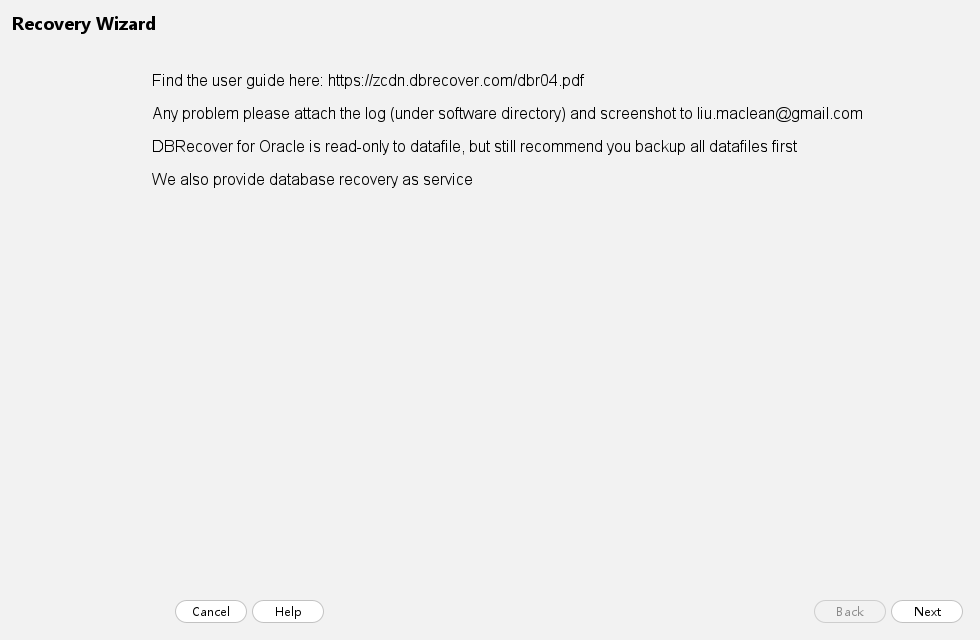
- Read the welcome page and click Next.
Step 2: choose dictionary mode
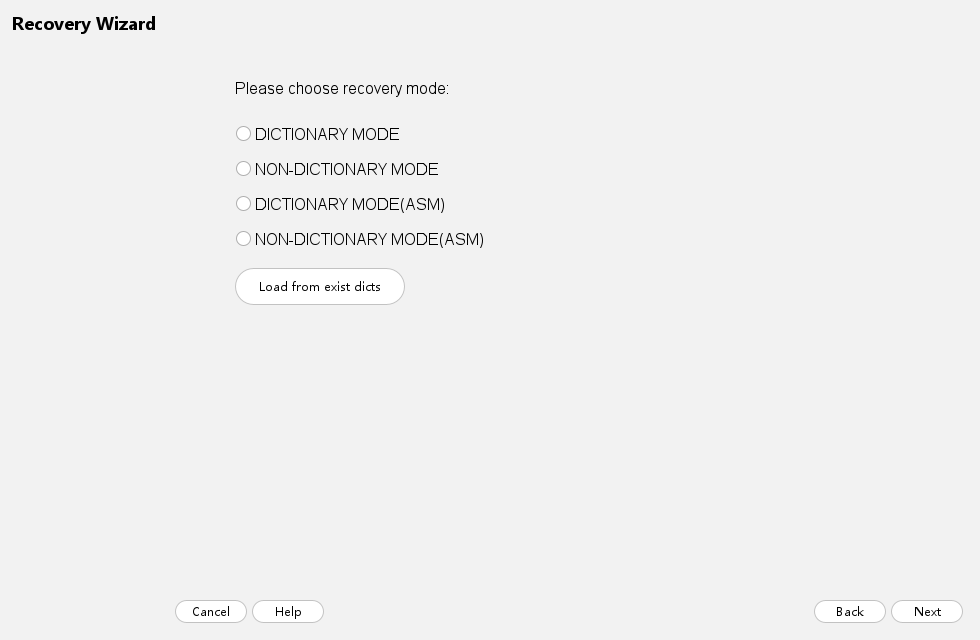
- Select the option for recovery with SYSTEM tablespace.
- Use ASM options only for ASM-sourced files.
- Use no-SYSTEM mode only for the dedicated
dbf_system_missingscenario. - Click Next.
SYSTEM01.DBF is present.Step 3: confirm database options
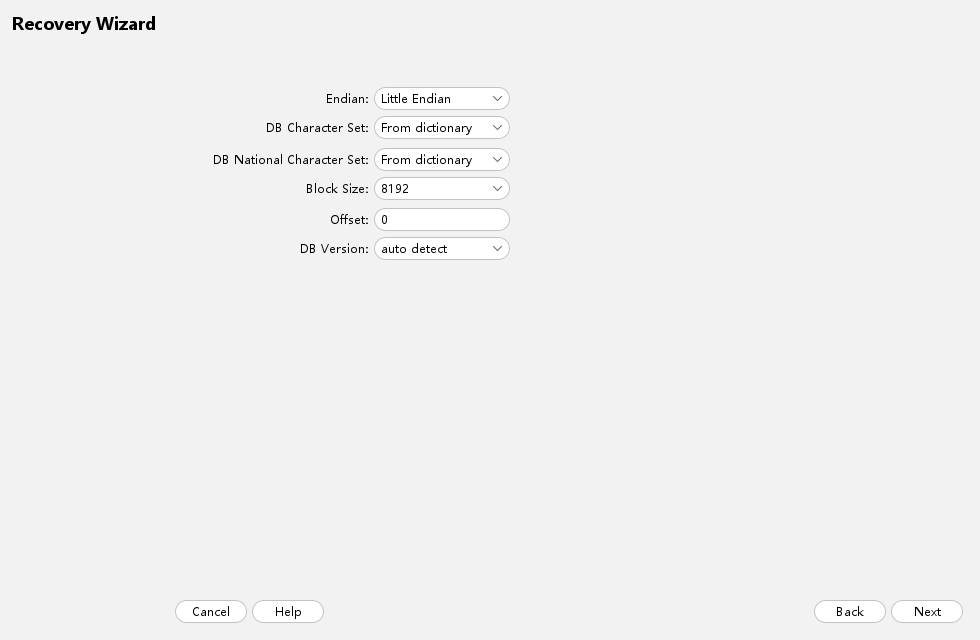
- Keep Endian as Little Endian for this Oracle 19c Linux x86-64 sample.
- Use automatic dictionary character-set detection. C6 was generated as AL32UTF8 and DBRecover maps it to UTF-8 internally.
- Keep Block Size as
8192. - Keep Offset as
0for normal DBF files. - Keep database version on automatic detection unless support gives a specific override.
- Click Next.
Step 4: add the clean C6 files
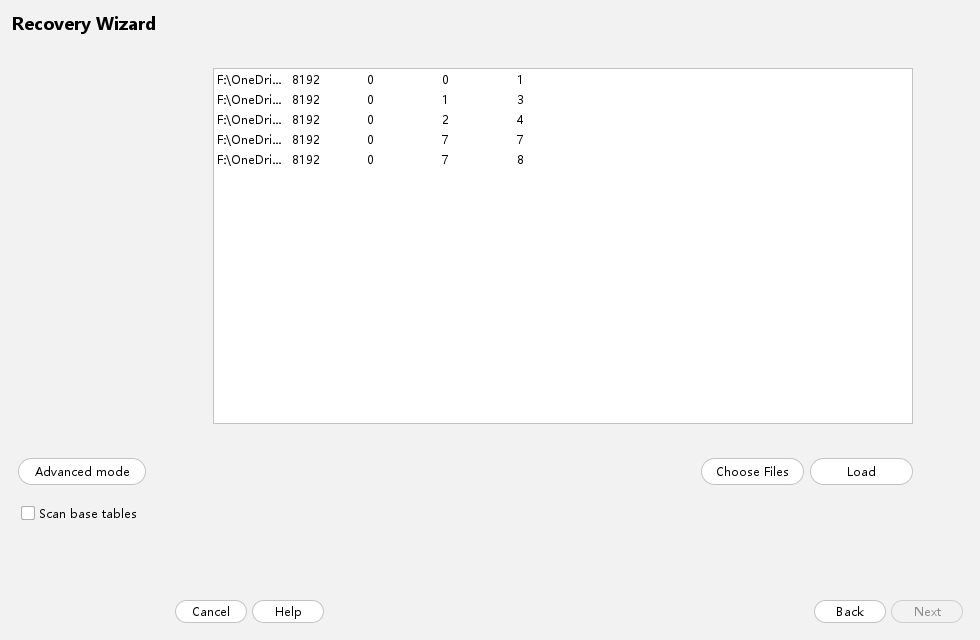
- Click Choose Files.
- Select files from
D:\dbrecover-samples\c6x260516_oo19c_v1\dbf_clean. - Include
SYSTEM01.DBF,SYSAUX01.DBF,UNDOTBS01.DBF,C6X260516_TS01.DBF,C6X260516_TS02.DBF, andC6X260516_DROP_TS01.DBF. - Keep block size
8192and offset0for each DBF unless a header-specific investigation requires manual values. - Click Load.
External file list option
For repeatable validation, prepare a text file and use the external file-list loader. Keep one file per line:
"D:\dbrecover-samples\c6x260516_oo19c_v1\dbf_clean\SYSTEM01.DBF" 8192 0
"D:\dbrecover-samples\c6x260516_oo19c_v1\dbf_clean\SYSAUX01.DBF" 8192 0
"D:\dbrecover-samples\c6x260516_oo19c_v1\dbf_clean\UNDOTBS01.DBF" 8192 0
"D:\dbrecover-samples\c6x260516_oo19c_v1\dbf_clean\C6X260516_TS01.DBF" 8192 0
"D:\dbrecover-samples\c6x260516_oo19c_v1\dbf_clean\C6X260516_TS02.DBF" 8192 0
"D:\dbrecover-samples\c6x260516_oo19c_v1\dbf_clean\C6X260516_DROP_TS01.DBF" 8192 0
Load completion checks
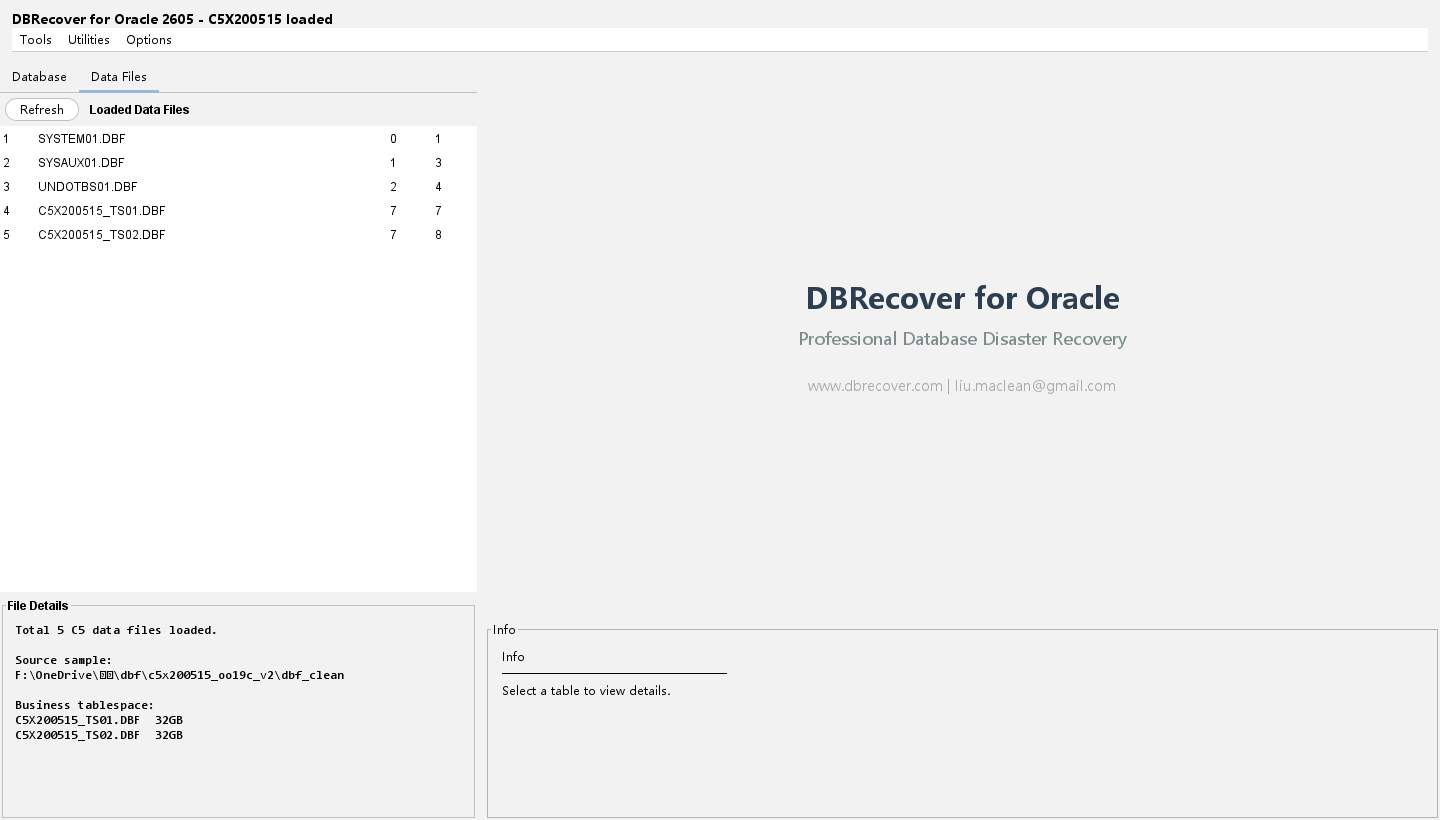
| Database name | The database tree should show OO19C or the database name recovered from the datafile headers. |
| Schema | Expand Users and confirm C6X260516. |
| Data files tab | Open Data Files and confirm every loaded DBF has block size 8192 and offset 0. |
| Invalid pass | Do not accept a load that shows only a few C6 tables when the inherited C5 baseline is expected. That usually means the wrong DBFs were selected or dictionary metadata is incomplete. |
5. Browse the Loaded C6 Schema
After the wizard finishes, expand the database tree, then expand Users, then C6X260516. The left tree should expose the C6 schema and its object folders.
Expected object surface
| Area | Expected evidence | Why it matters |
|---|---|---|
| Inherited C5 baseline | 347 inherited C5_% tables | Preserves broad object/type coverage from C5. |
| C6 guide layer | 25 C6_% scenario tables | Ensures guide workflows are concrete data cases. |
| Views | 3 C6 views | Needed for DDL browsing and DB link probe. |
| Triggers | 2 C6 triggers | Needed for DDL export and object browsing. |
| Materialized view | 1 C6 materialized view, refresh check OK | Proves the DDL path handles mviews. |
| DB link | 1 optional DB link | Proves DB links are not ignored by GUI browsing and DDL export. |
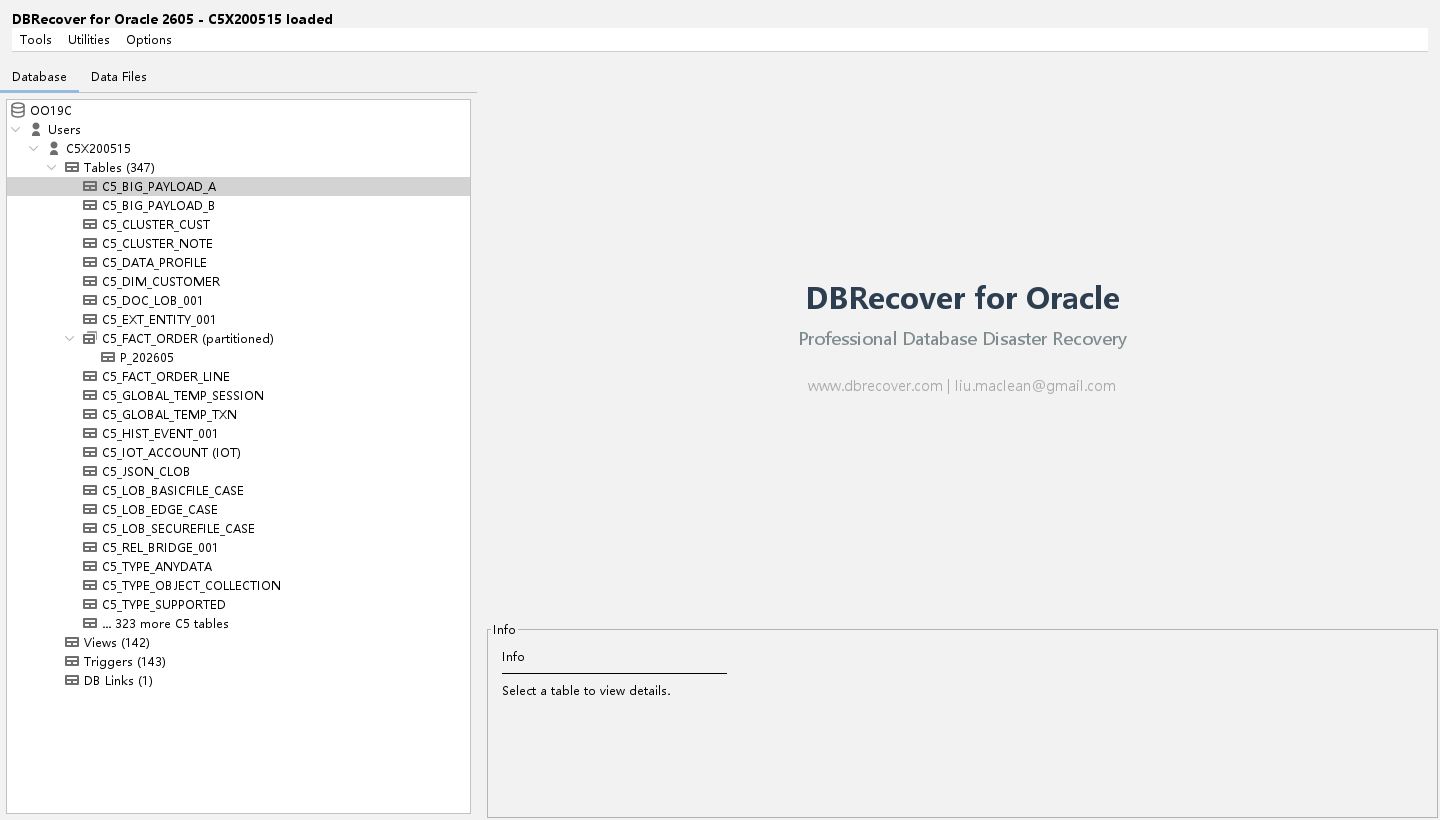
C6X260516 user plus inherited C5 baseline objects and C6 scenario objects.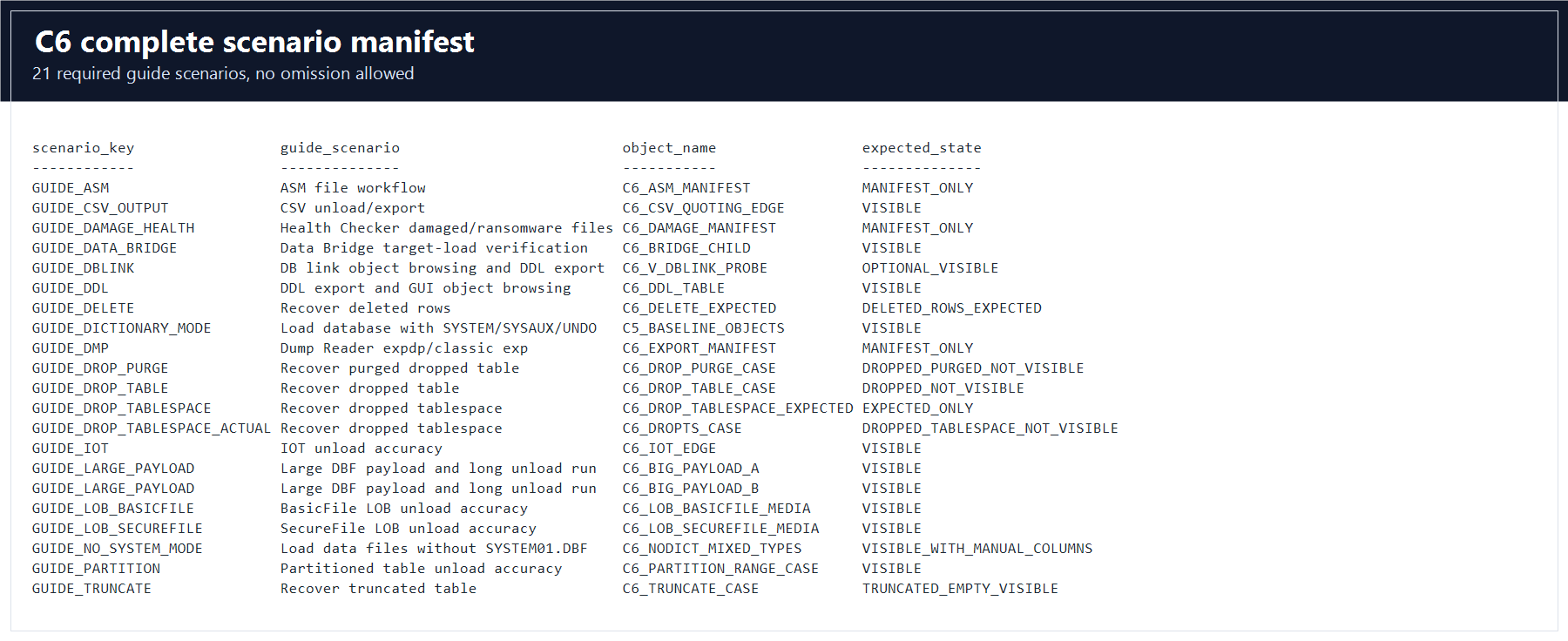
Tables that must be visible
At a minimum, confirm these named tables or expected baseline tables in the tree or table-search dialog:
| Category | Objects |
|---|---|
| Large payload | C6_BIG_PAYLOAD_A, C6_BIG_PAYLOAD_B |
| LOB | C6_LOB_BASICFILE_MEDIA, C6_LOB_SECUREFILE_MEDIA |
| Special structures | C6_IOT_EDGE, C6_PARTITION_RANGE_CASE |
| CSV and no-SYSTEM | C6_CSV_QUOTING_EDGE, C6_NODICT_MIXED_TYPES |
| Data Bridge | C6_BRIDGE_PARENT, C6_BRIDGE_CHILD, C6_BRIDGE_LOB |
| Recovery baselines | C6_DELETE_EXPECTED, C6_TRUNCATE_EXPECTED, C6_DROP_TABLE_EXPECTED, C6_DROP_PURGE_EXPECTED, C6_DROP_TABLESPACE_EXPECTED |
Schema and table context menus
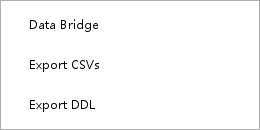
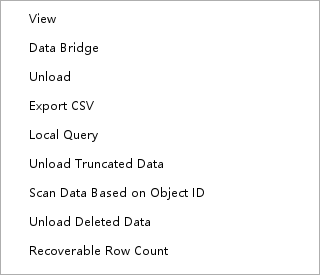
Right-click the schema node for schema-level actions. Right-click a table for table-level actions.
6. Export Recovered Data to CSV
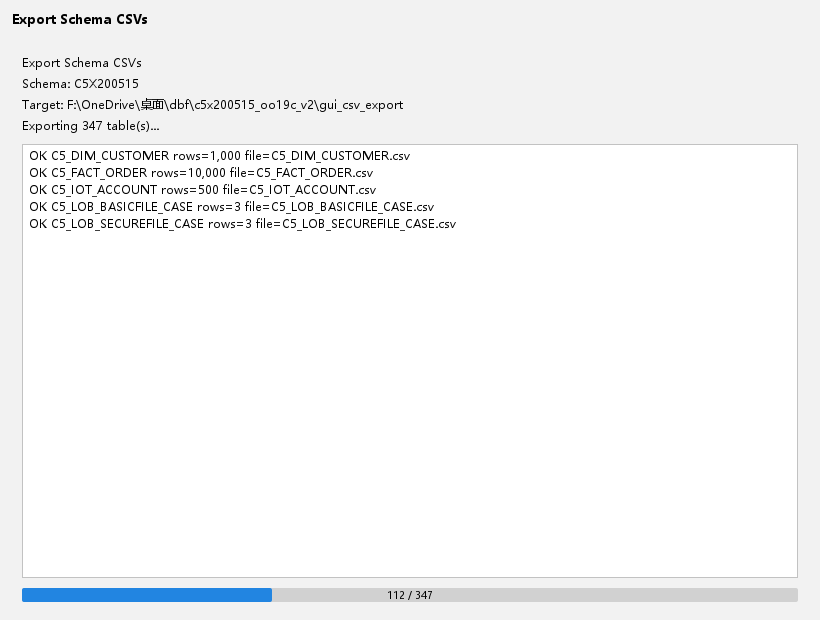
CSV export is a primary customer workflow and a C6 validation gate. Do not validate CSV export only by checking that a file was created. Validate row counts, quoting, line breaks, dates, numbers, NULLs, and special table structures.
Single-table CSV export
- Load the clean C6 database in dictionary mode.
- Expand
C6X260516and right-clickC6_CSV_QUOTING_EDGE. - Select the table-level CSV export action.
- Choose an output directory outside the DBF sample tree, for example
D:\dbrecover-output\c6-csv. - Start the export and wait for the progress dialog to finish.
- Open the generated CSV in a text editor that can display CRLF and quotes.
- Confirm row count
64.
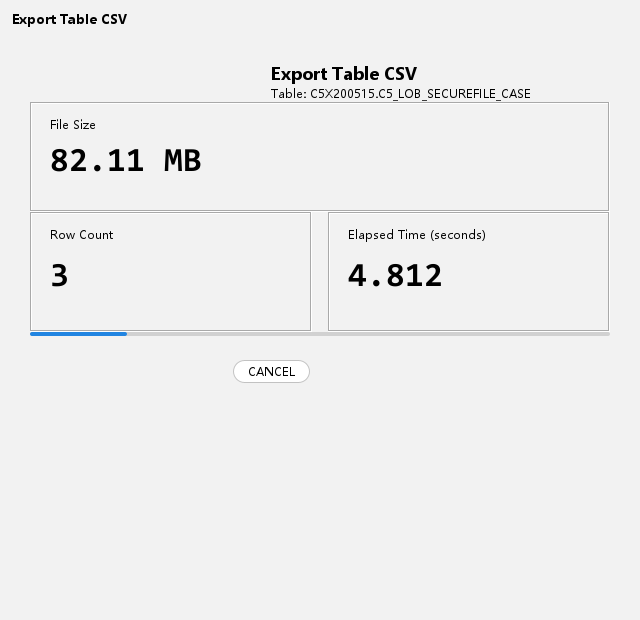
C6_CSV_QUOTING_EDGE first.CSV quoting rules to verify
| Data condition | Expected output behavior |
|---|---|
| Comma inside text | The field is quoted and the comma stays inside the field. |
| Double quote inside text | The quote is escaped according to CSV rules. |
| Embedded CRLF | The line break stays inside one quoted field and does not create a false row. |
| NULL value | The NULL representation is consistent with the selected export option. |
| Number and date columns | Values are not silently converted to unreadable locale-specific text. |
Partitioned table export
- Right-click
C6_PARTITION_RANGE_CASE. - Export it to CSV.
- Compare the output to
COUNT(*) = 12000andSUM(amount) = 226098840.00. - Confirm rows from all partitions are present. A pass that only exports one partition is invalid.
IOT export
- Right-click
C6_IOT_EDGE. - Export the table to CSV.
- Compare the output to
COUNT(*) = 4096andSUM(balance) = 93220188.16. - Confirm the row order and key columns are stable enough for customer review.
Large payload export
C6 contains two large payload tables to prove that the 32 GB files contain real recoverable rows:
| Table | Expected count | Expected SUM(amount) | Recommended use |
|---|---|---|---|
C6_BIG_PAYLOAD_A | 4,000,000 | 9,360,002,340,000.00 | Long-running export and performance soak. |
C6_BIG_PAYLOAD_B | 4,000,000 | 10,480,002,620,000.00 | Second-file coverage and long-running export. |
CSV pass and fail rules
| Pass | CSV files exist, row counts match, sums match, quoted text remains parseable, multiline values do not create false rows, and NULL handling is documented. |
| Fail | A file exists but contains only headers, one partition only, locator strings instead of LOB bytes, empty IOT overflow columns, or counts that are not compared to the manifest. |
| Evidence | The full gate writes logs\c6_unload_accuracy_report.csv; the CSV, IOT, partition, and big-payload rows must be PASS. |
7. BasicFile and SecureFile LOB Validation
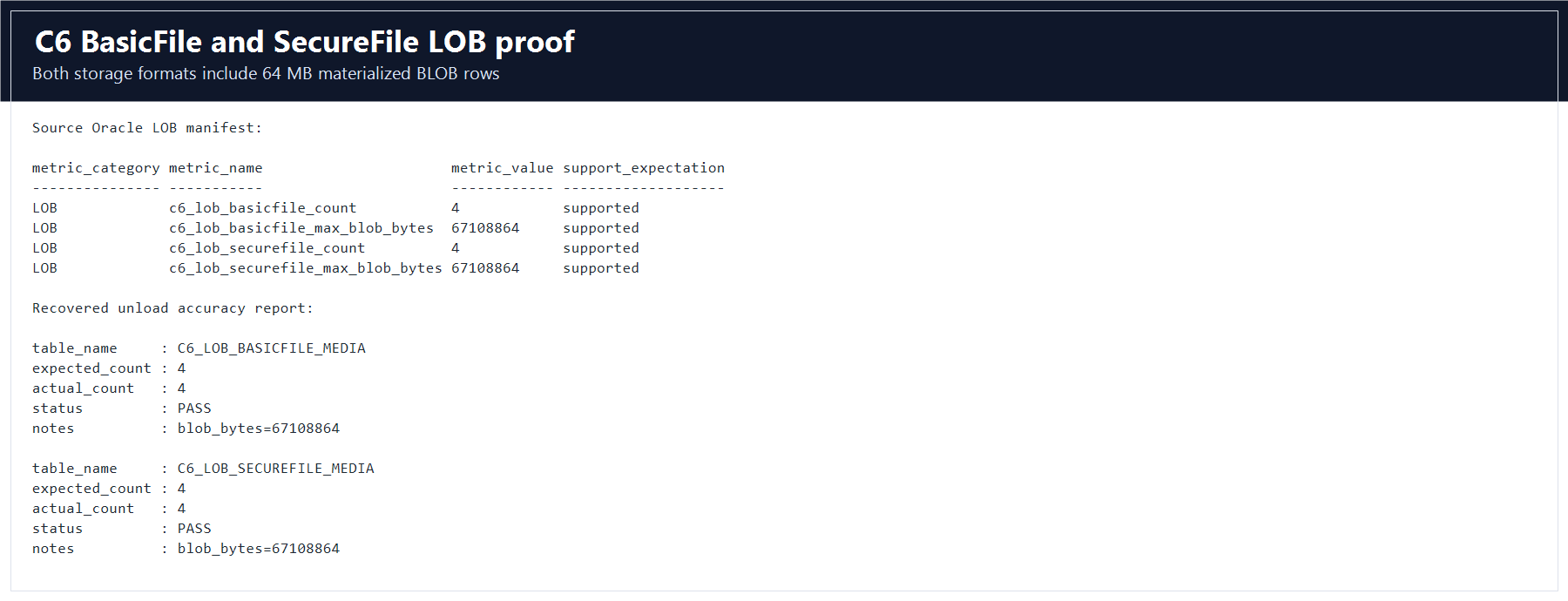
LOB testing is one of the main reasons C6 exists. A LOB result is valid only when DBRecover materializes the actual bytes or text. A locator string, a preview-only value, or a zero-byte output file is a failure.
LOB objects
| Table | LOB type | Rows | Largest BLOB | Included payloads |
|---|---|---|---|---|
C6_LOB_BASICFILE_MEDIA | BasicFile | 4 | 67,108,864 bytes | 1 MB, 8 MB, 32 MB, and 64 MB PDF-sized BLOB rows, plus CLOB and NCLOB. |
C6_LOB_SECUREFILE_MEDIA | SecureFile | 4 | 67,108,864 bytes | 1 MB, 8 MB, 32 MB, and 64 MB PDF-sized BLOB rows, plus CLOB and NCLOB. |
GUI steps
- Load the clean C6 DBF set.
- Right-click
C6_LOB_BASICFILE_MEDIAand export the table. - Repeat for
C6_LOB_SECUREFILE_MEDIA. - Inspect the output directory for materialized BLOB files or the configured LOB output format.
- Record actual BLOB byte lengths for each row.
- Confirm the largest BasicFile and SecureFile BLOB outputs are at least
67108864bytes. - Open the CLOB and NCLOB output and confirm UTF-8 text is not garbled.
Invalid LOB results
| Observed result | Status | Reason |
|---|---|---|
| CSV contains only a LOB locator or object id | Fail | The actual LOB content was not recovered. |
| Output BLOB file is zero bytes | Fail | The row was listed but the payload was not materialized. |
| 64 MB payload is truncated to a small preview | Fail | Preview mode is not unload accuracy. |
| BasicFile passes but SecureFile is skipped | Fail | C6 requires both storage formats. |
| Both tables produce expected byte lengths | Pass | The GUI recovered actual LOB data. |
Damaged LOB block scenario
The controlled damaged LOB file is:
D:\dbrecover-samples\c6x260516_oo19c_v1\dbf_damaged\c6x260516_ts02_lob_block_flip.dbfThe damage generation log records a modified SecureFile BLOB extent from C6_LOB_SECUREFILE_MEDIA.BLOB_PAYLOAD. In the damaged-file workflow, DBRecover must report the affected LOB accurately. It must not silently report all LOBs as recovered when one known LOB block was modified.
8. Deleted, Truncated, Dropped, and Dropped-Tablespace Recovery
C6 includes separate expected baseline tables so that recovery tests compare actual output to known-good data. This prevents false passes caused by an empty dictionary state.
Recovery case matrix
| Case | GUI target | Expected source of truth | Gate |
|---|---|---|---|
| DELETE | C6_DELETE_CASE | C6_DELETE_EXPECTED | 400 deleted rows must be recoverable and compared. |
| TRUNCATE | C6_TRUNCATE_CASE | C6_TRUNCATE_EXPECTED | Visible table is empty, expected table has 1500 original rows. |
| DROP TABLE | C6_DROP_TABLE_CASE | C6_DROP_TABLE_EXPECTED | Dropped table is not visible in dictionary, expected table has 1500 rows. |
| DROP PURGE | C6_DROP_PURGE_CASE | C6_DROP_PURGE_EXPECTED | Purged dropped table is not visible in dictionary, expected table has 1500 rows. |
| DROP TABLESPACE | C6X260516_DROP_TS01.DBF | C6_DROP_TABLESPACE_EXPECTED | Dropped tablespace datafile is retained and expected table has 1500 rows. |
DELETE workflow
- Load the clean C6 files.
- Locate
C6_DELETE_CASEandC6_DELETE_EXPECTED. - Use the table-level deleted-row recovery option for
C6_DELETE_CASE. - Export the recovered deleted rows.
- Compare row count and numeric sums to
C6_DELETE_EXPECTED.
TRUNCATE workflow
- Locate
C6_TRUNCATE_CASEin the loaded schema. It should be visible but empty. - Use the truncate recovery workflow or raw table recovery path provided by the GUI.
- Export recovered rows.
- Compare to
C6_TRUNCATE_EXPECTED, which has 1500 rows.
DROP TABLE and DROP PURGE workflows
- Use dropped-object recovery features to search for dropped table metadata and extents.
- For normal drop, use
C6_DROP_TABLE_EXPECTEDas the comparison source. - For purge, use
C6_DROP_PURGE_EXPECTEDas the comparison source. - Record recovered row count, exported file size, and any unsupported metadata warning.
DROP TABLESPACE workflow
- Load the clean C6 files and include
C6X260516_DROP_TS01.DBF. - Use the raw datafile recovery workflow to inspect the retained dropped-tablespace file.
- Recover data for the dropped tablespace scenario.
- Compare recovered data to
C6_DROP_TABLESPACE_EXPECTED, which has 1500 rows.
9. No-SYSTEM Manual Recovery
Use this scenario when SYSTEM01.DBF is missing, unreadable, or not provided by the customer. C6 provides a dedicated no-SYSTEM file set:
D:\dbrecover-samples\c6x260516_oo19c_v1\dbf_system_missingGUI steps
- Start a new recovery session.
- Select the mode for recovery without SYSTEM tablespace.
- Add files from
dbf_system_missing. Do not addSYSTEM01.DBF. - Keep block size
8192and offset0. - Use manual column definition or the GUI's no-dictionary table-definition workflow.
- Define
C6_NODICT_MIXED_TYPESwith its scalar, RAW, BLOB, and CLOB columns. - Unload the table and compare row count to
128.
What makes the test valid
- The input directory must not contain
SYSTEM01.DBF. - The GUI must not reuse dictionary metadata from a previous clean C6 session.
- The output must contain real values for scalar, RAW, BLOB, and CLOB fields.
- The final report must record
C6_NODICT_MIXED_TYPESwithstatus=PASS.
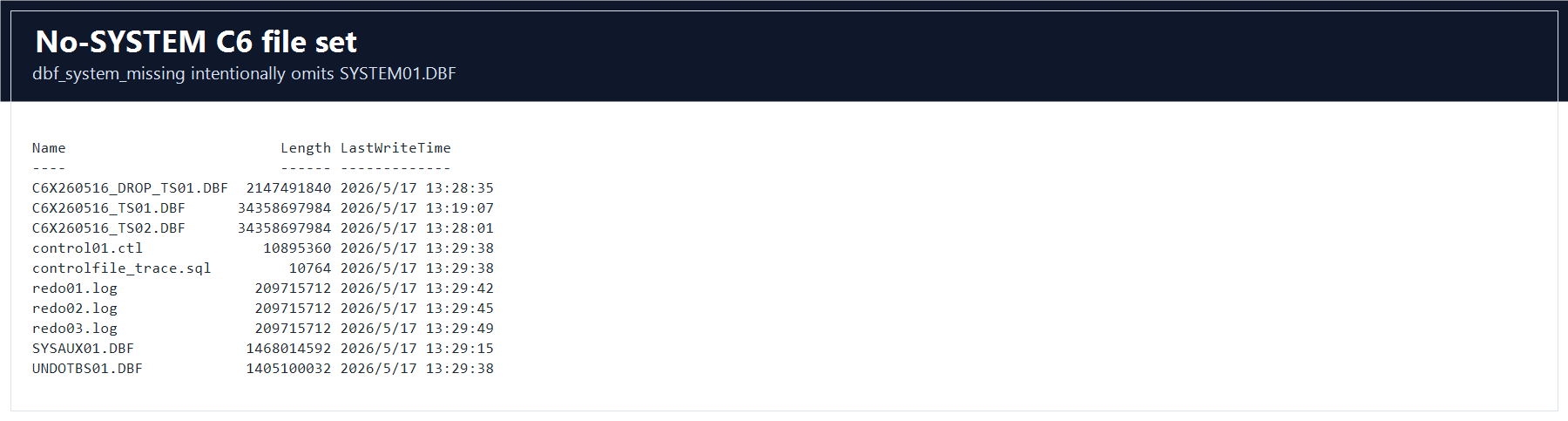
SYSTEM01.DBF instead of accidentally running dictionary mode.10. Damaged and Ransomware File Workflows
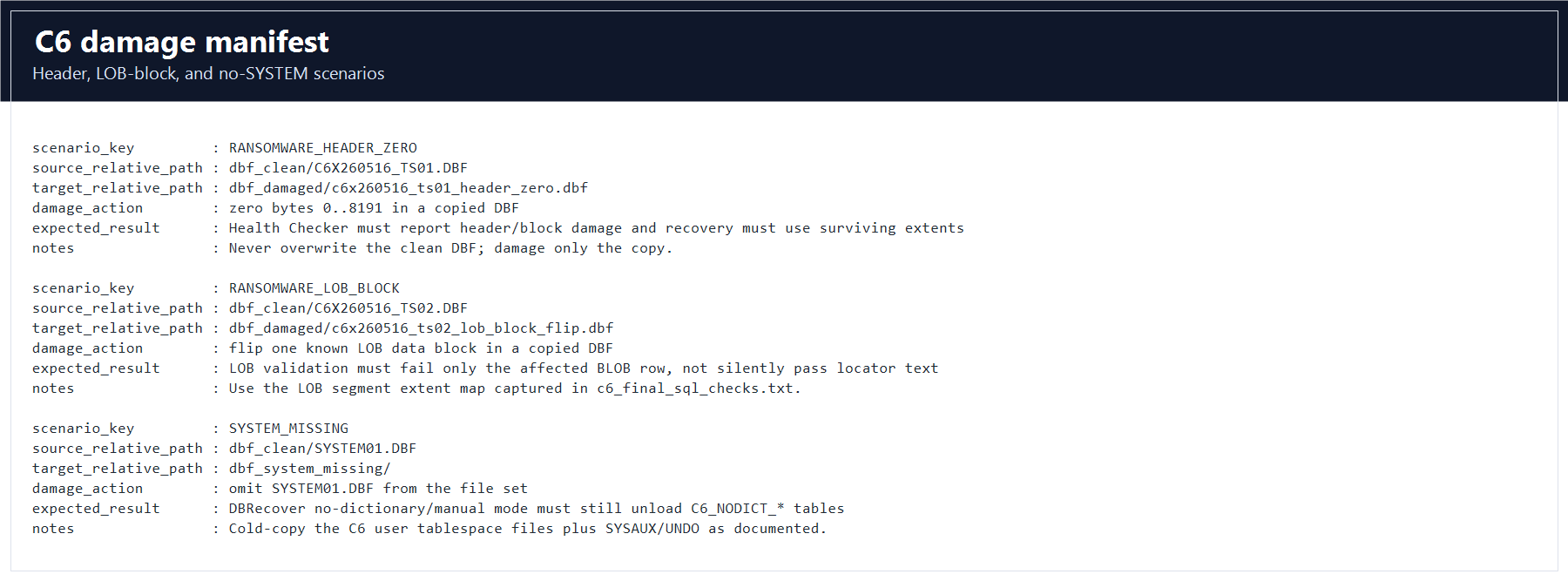
C6 includes controlled damage artifacts. Use only copied damaged DBFs; never damage the clean set.
| Scenario | Input | Expected behavior |
|---|---|---|
RANSOMWARE_HEADER_ZERO | dbf_damaged\c6x260516_ts01_header_zero.dbf | Health Checker reports header or block damage. Recovery must use surviving metadata and extents where possible. |
RANSOMWARE_LOB_BLOCK | dbf_damaged\c6x260516_ts02_lob_block_flip.dbf | LOB validation must identify or fail affected LOB content instead of silently passing locator text. |
SYSTEM_MISSING | dbf_system_missing\ | No-dictionary mode remains usable for manually defined tables. |
Health Checker steps
- Open the Health Checker or datafile diagnostic utility.
- Add one damaged DBF at a time.
- Run the check and save the diagnostic output.
- Record whether the tool reports file header, block, checksum, or LOB-level problems.
- Do not mix damaged files with clean files unless the scenario explicitly requires it.
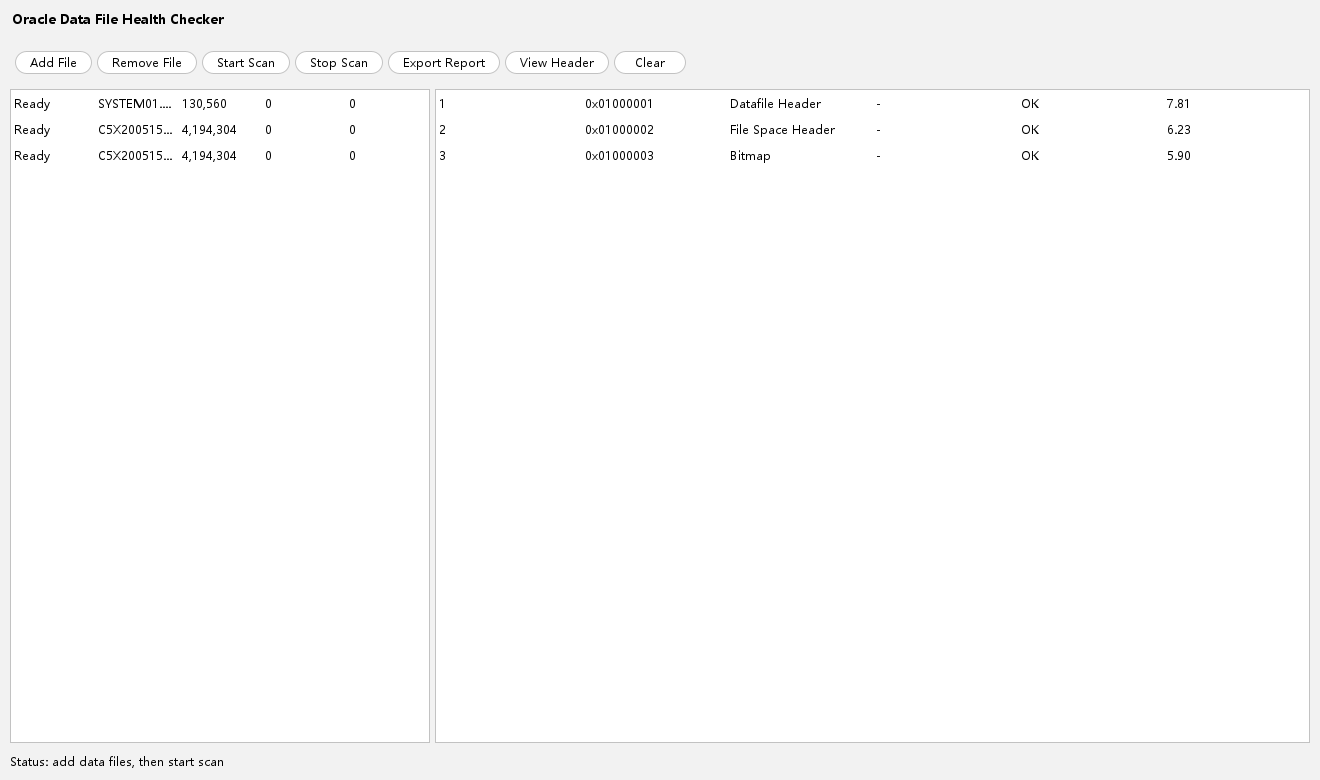
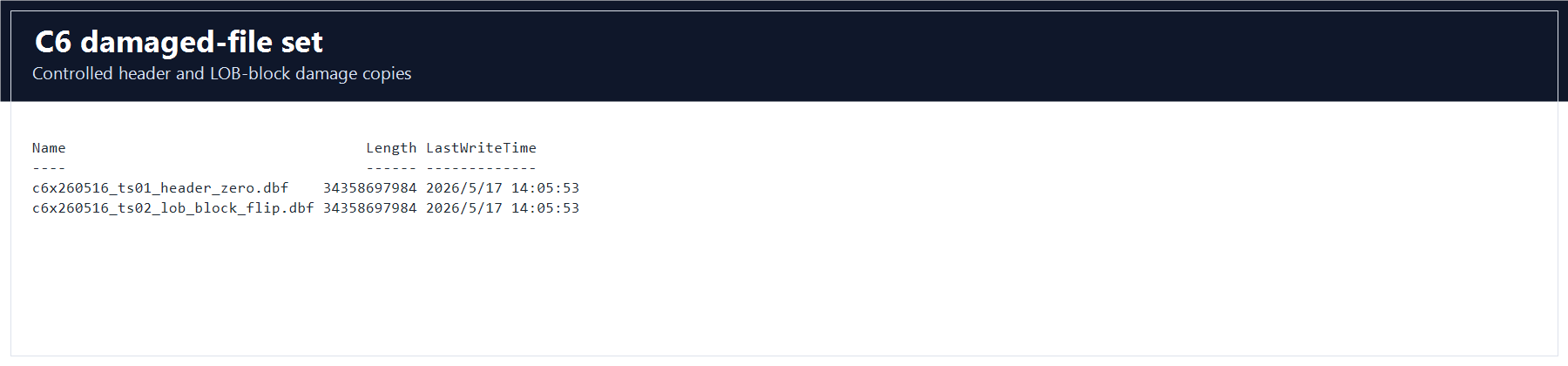
dbf_clean.11. ASM File Workflow
The public user guide includes ASM source-file handling. C6 covers that workflow through logs\c6_asm_manifest.csv, which maps ASM-style aliases to copied DBF files.
GUI steps
- Open Tools.
- Select ASM File Clone or the ASM copy workflow available in the build.
- Use the ASM alias names from
logs\c6_asm_manifest.csvas the source reference. - Copy or map the ASM files to local DBF files under the C6 sample directory.
- Load the resulting local DBFs with Recovery Wizard.
- Confirm the loaded schema matches the clean C6 dictionary-mode result.
Validation
The manifest gate is c6_asm_manifest_count = 2. A valid ASM test must prove that the copied DBFs can be opened and loaded, not only that alias strings exist.
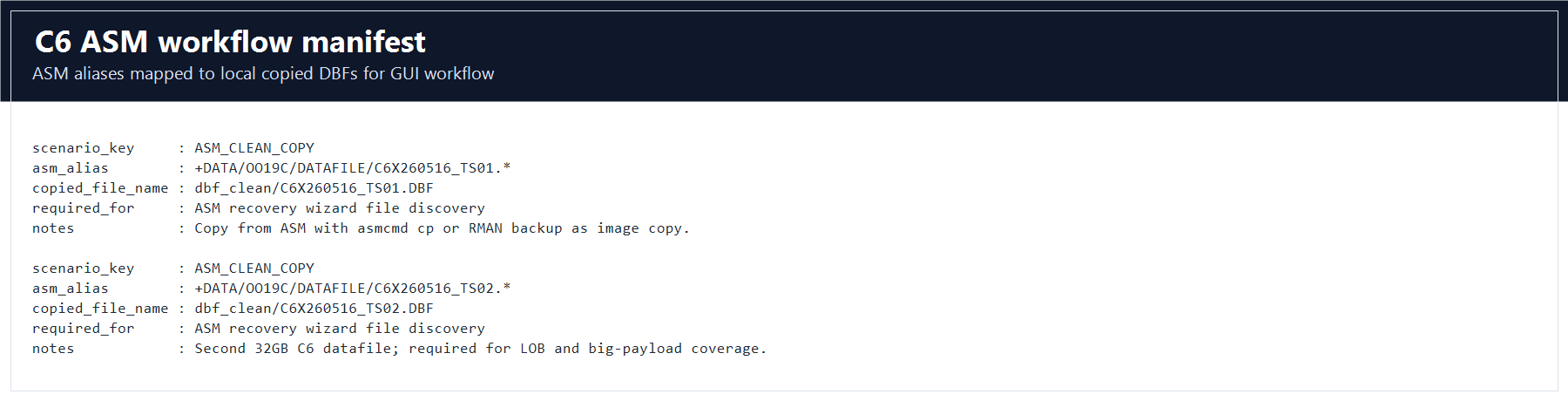
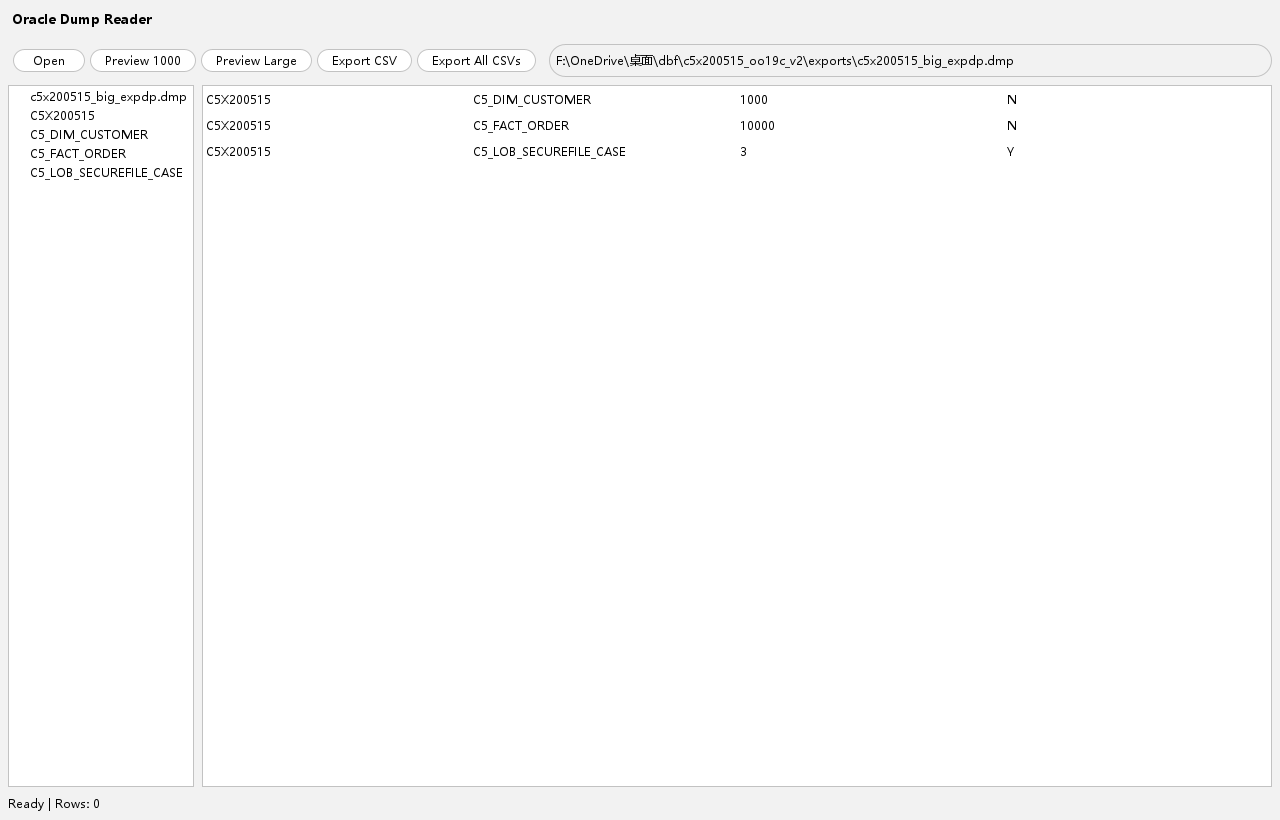
12. Oracle Dump Reader for EXPDP and Classic EXP
C6 includes both export formats. Use Dump Reader to verify that DBRecover handles Data Pump and classic exp artifacts.
Files
| Kind | File | Required content |
|---|---|---|
| Data Pump | exports\c6x260516_expdp.dmp | C6 schema objects, LOB tables, IOT, partitioned table, CSV table, bridge tables, and expected recovery tables. |
| Classic exp | exports\c6x260516_classic_exp.dmp | C6 schema objects that classic exp supports. Unsupported Oracle types may be reported in the export log. |
GUI steps
- Open the Dump Reader utility from the GUI.
- Open
D:\dbrecover-samples\c6x260516_oo19c_v1\exports\c6x260516_expdp.dmp. - Confirm that C6 objects are listed.
- Check that
C6_LOB_BASICFILE_MEDIA,C6_LOB_SECUREFILE_MEDIA,C6_IOT_EDGE,C6_PARTITION_RANGE_CASE,C6_BRIDGE_CHILD, andC6_CSV_QUOTING_EDGEare discoverable. - Repeat with
c6x260516_classic_exp.dmp. - Record any classic exp unsupported-type warnings from
c6x260516_classic_exp.log.
13. DDL Export and Object Browsing
C6 verifies that DBRecover exports schema definition details, not just table rows. The DDL scenario is anchored by C6_DDL_TABLE and related objects.
Required DDL objects
| Object type | C6 expectation |
|---|---|
| Tables | C6_DDL_TABLE is visible and has 500 rows. |
| Views | At least 3 C6 views are present, including C6_V_DBLINK_PROBE when the DB link is enabled. |
| Triggers | 2 C6 triggers are present. |
| Materialized view | 1 C6 materialized view is present and refresh check is OK. |
| Sequence and synonym | Required for the DDL scenario object surface. |
| DB link | C6_LOOPBACK and C6_V_DBLINK_PROBE are present in this generated sample. |
GUI steps
- Load the clean C6 DBF set.
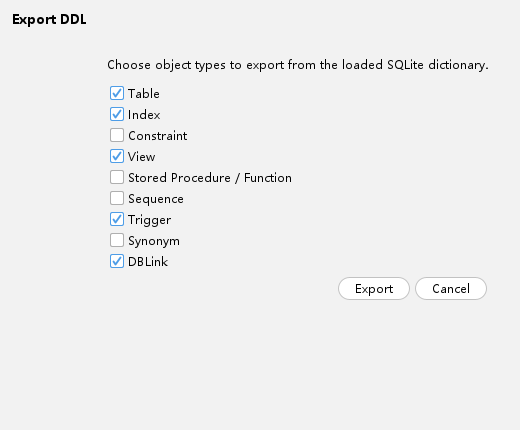
- Right-click the
C6X260516schema node. - Choose Export DDL.
- Select tables, indexes, constraints, views, stored procedures or functions if present, sequences, triggers, synonyms, and DB links.
- Export DDL to an output directory.
- Open the DDL file and search for
C6_DDL_TABLE,C6_LOOPBACK, trigger definitions, materialized view definitions, and synonyms.
14. Data Bridge to a Target Oracle Database
Data Bridge validates that DBRecover can move recovered data into a target database and preserve relational data shape. C6 uses parent, child, and LOB bridge tables.
Prepare the target database
- Use a clean target schema that is not
C6X260516, for exampleC6_BRIDGE_TARGET. - Confirm target tablespace capacity. C6 LOB and large-payload tables are intentionally large.
- Use a smaller subset first if you only need to verify connection setup.
- For full validation, run the required C6 bridge tables and compare counts and sums.
Create a Data Bridge connection
- Right-click the
C6X260516schema node or a specific C6 table. - Select Data Bridge.
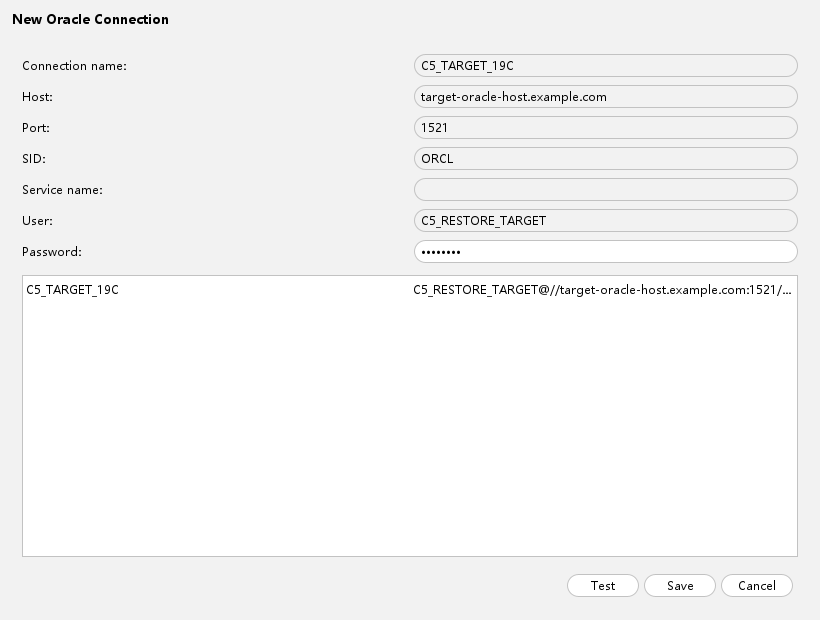
- Create or choose an Oracle connection.
- Enter host, port, service name or SID, user, and password.
- Test the connection and save it.
Run C6 bridge validation
- Bridge
C6_BRIDGE_PARENT,C6_BRIDGE_CHILD, andC6_BRIDGE_LOB. - After the load finishes, run row-count and sum checks on the target database.
- Confirm
C6_BRIDGE_CHILDhasCOUNT(*) = 5000andSUM(child_amount) = 21879375.00. - Confirm LOB byte lengths in
C6_BRIDGE_LOBmatch the source. - Record the target schema name, DBRecover build number, and validation SQL output.
SELECT COUNT(*), SUM(child_amount)
FROM C6_BRIDGE_CHILD;
15. Local Query and Diagnostic Utilities
Use local query tools to spot-check recovered content before running long exports.
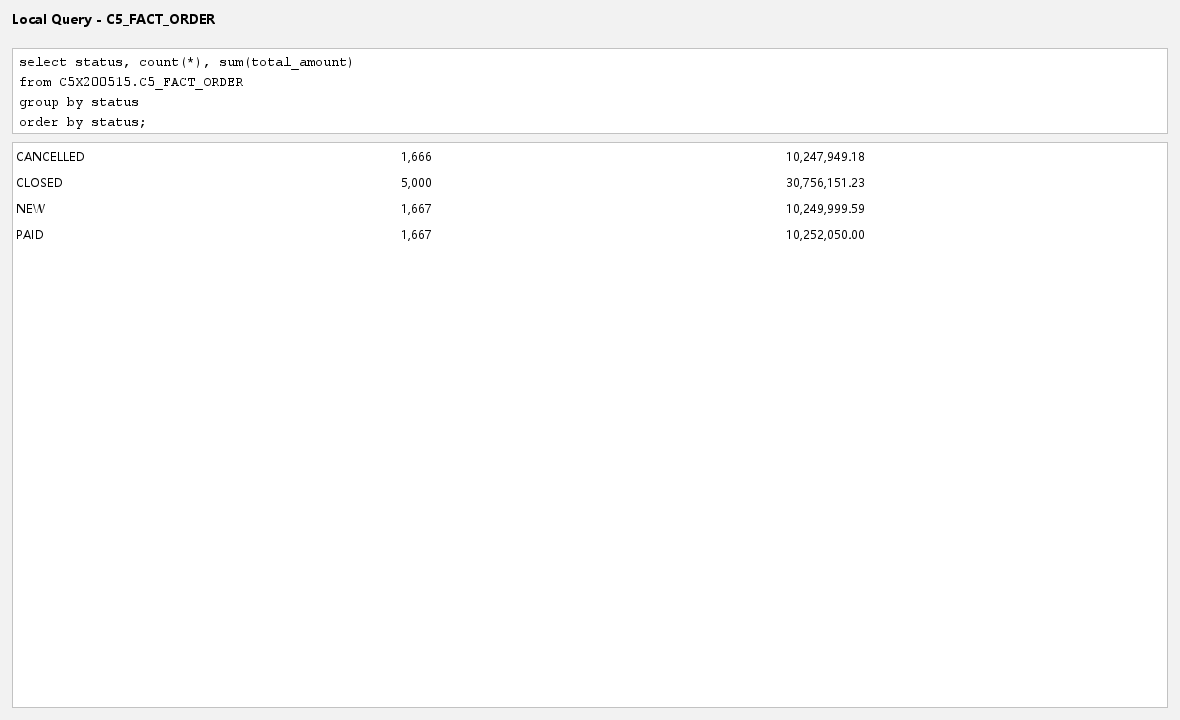
Local Query
- Open the Local Query utility from the loaded C6 session.
- Run simple checks against visible C6 tables.
- Compare results to
logs\c6_validity_manifest.csv.
Useful C6 checks
SELECT COUNT(*), SUM(amount) FROM C6_PARTITION_RANGE_CASE;
SELECT COUNT(*), SUM(balance) FROM C6_IOT_EDGE;
SELECT COUNT(*), MAX(DBMS_LOB.GETLENGTH(blob_payload)) FROM C6_LOB_BASICFILE_MEDIA;
SELECT COUNT(*), MAX(DBMS_LOB.GETLENGTH(blob_payload)) FROM C6_LOB_SECUREFILE_MEDIA;
SELECT COUNT(*), SUM(child_amount) FROM C6_BRIDGE_CHILD;
Oracle Query utility
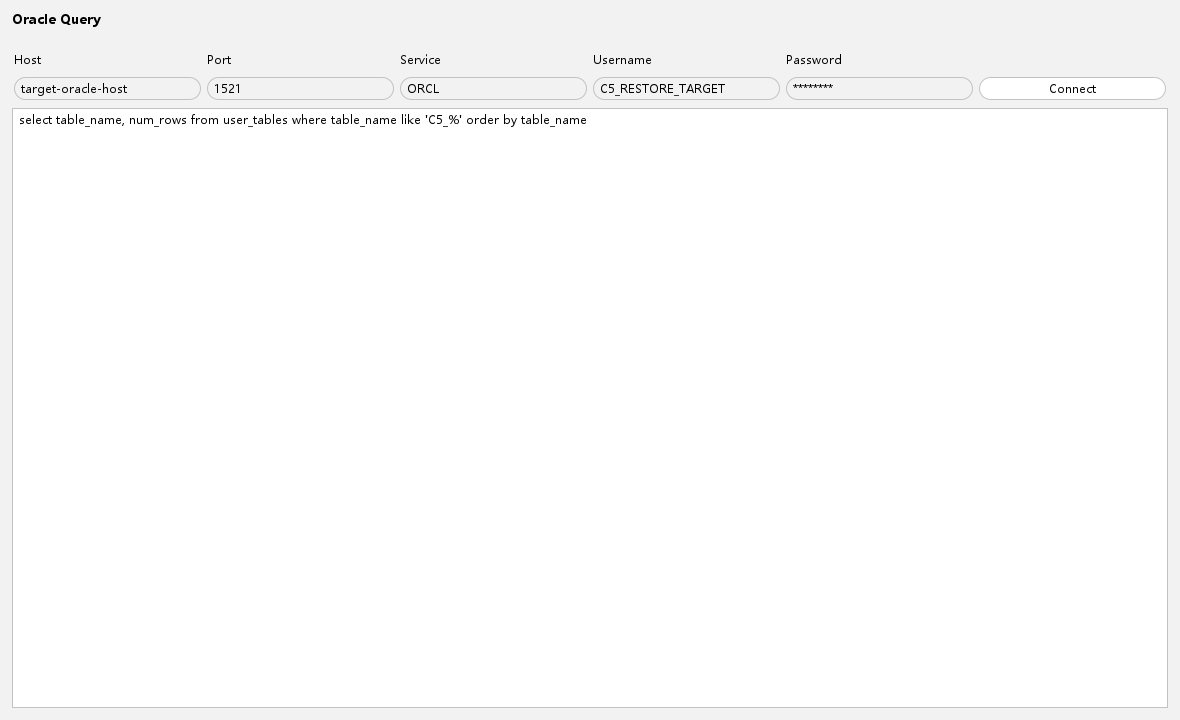
Use Oracle Query when a live Oracle source or target database is available. It is useful for comparing source SQL results to DBRecover output and Data Bridge output.
16. Final C6 Release Validation
C6 has two levels of automated validation. Quick mode verifies layout, manifests, and artifact presence. Full mode additionally requires actual DBRecover unload accuracy results.
Quick gate
Use quick mode after copying or refreshing the sample:
.\scripts\validation-tests\run-c6x260516-validation-test.ps1 -Mode quick -SkipHashes -SkipDumpParse -SkipDataAccuracyThe reference package passed quick validation with report:
target\c6x260516-validation-report\quick-runFull gate
Use full mode before validation sign-off:
.\scripts\validation-tests\run-c6x260516-validation-test.ps1 -Mode fullThe reference package passed full validation with report:
target\c6x260516-validation-report\full-runResult summary:
Tests run: 9, Failures: 0, Errors: 0, Skipped: 0
BUILD SUCCESS
hashEnabled=True
dumpParseEnabled=True
dataAccuracyEnabled=True
validityManifestRequired=True
The full gate must consume DBRecover-generated output and write:
D:\dbrecover-samples\c6x260516_oo19c_v1\logs\c6_unload_accuracy_report.csvRequired unload accuracy rows
| Required table | Required comparison |
|---|---|
C6_CSV_QUOTING_EDGE | Row count and CSV quoting validation. |
C6_NODICT_MIXED_TYPES | No-SYSTEM row count and concrete scalar/RAW/LOB values. |
C6_BRIDGE_CHILD | Row count and SUM(child_amount). |
C6_IOT_EDGE | Row count and SUM(balance). |
C6_PARTITION_RANGE_CASE | Row count and SUM(amount). |
C6_DDL_TABLE | Rows inserted through DDL/trigger scenario; row count and sum must match. |
C6_LOB_BASICFILE_MEDIA | Rows, CLOB/NCLOB correctness, and materialized BLOB byte lengths. |
C6_LOB_SECUREFILE_MEDIA | Rows, CLOB/NCLOB correctness, and materialized BLOB byte lengths. |
C6_DELETE_EXPECTED | Recovered deleted rows compared to expected baseline. |
C6_TRUNCATE_EXPECTED | Recovered truncated rows compared to expected baseline. |
C6_DROP_TABLE_EXPECTED | Recovered dropped-table rows compared to expected baseline. |
C6_DROP_PURGE_EXPECTED | Recovered purged dropped-table rows compared to expected baseline. |
C6_DROP_TABLESPACE_EXPECTED | Recovered dropped-tablespace data compared to expected baseline. |
C6_BIG_PAYLOAD_A | 4,000,000-row count, deterministic sum, and concrete sample rows. |
C6_BIG_PAYLOAD_B | 4,000,000-row count, deterministic sum, and concrete sample rows. |
PASS; validation sign-off should include this file.Manual sign-off checklist
- Clean C6 DBFs load successfully and show
C6X260516. logs\c6_local_sha256_verify.csvhasOKfor 13 key files.- Both C6 32 GB DBFs are present and have exact size
34,358,697,984bytes. - Both dump files open in Dump Reader.
- BasicFile and SecureFile 64 MB BLOB outputs are materialized bytes.
- IOT and partitioned table outputs match count and sum.
- DELETE, TRUNCATE, DROP, DROP PURGE, and DROP TABLESPACE cases compare to expected baselines.
- No-SYSTEM mode uses the
dbf_system_missingdirectory and does not addSYSTEM01.DBF. - Damaged-file checks use only
dbf_damagedcopies and do not alterdbf_clean. - Full mode exits successfully and every required row in
c6_unload_accuracy_report.csvhasPASS.
17. Complete C6 Scenario Coverage Matrix
This table is generated from the current C6 manifest and serves as the checklist for this guide. A complete validation run should account for every row.
| Manifest key | User-guide scenario | Object or artifact | Expected state | Gate |
|---|---|---|---|---|
GUIDE_ASM | ASM file workflow | C6_ASM_MANIFEST | Manifest only | 2 ASM alias mappings. |
GUIDE_CSV_OUTPUT | CSV unload/export | C6_CSV_QUOTING_EDGE | Visible | 64 rows with commas, quotes, CRLF, NULLs, numbers, and dates. |
GUIDE_DAMAGE_HEALTH | Health Checker damaged/ransomware files | C6_DAMAGE_MANIFEST | Manifest only | 3 damage scenarios. |
GUIDE_DATA_BRIDGE | Data Bridge target-load verification | C6_BRIDGE_CHILD | Visible | 5000 rows and SUM(child_amount) = 21879375.00. |
GUIDE_DBLINK | DB link object browsing and DDL export | C6_V_DBLINK_PROBE | Optional visible | Loopback DB link returns row count 1 in this sample. |
GUIDE_DDL | DDL export and GUI object browsing | C6_DDL_TABLE | Visible | 500 rows plus sequence, trigger, view, materialized view, synonym, DB link. |
GUIDE_DELETE | Recover deleted rows | C6_DELETE_EXPECTED | Deleted rows expected | 400 deleted rows. |
GUIDE_DICTIONARY_MODE | Load database with SYSTEM/SYSAUX/UNDO | C5_BASELINE_OBJECTS | Visible | Inherited C5 baseline, 347 tables. |
GUIDE_DMP | Dump Reader expdp/classic exp | C6_EXPORT_MANIFEST | Manifest only | 2 required dump artifacts. |
GUIDE_DROP_PURGE | Recover purged dropped table | C6_DROP_PURGE_CASE | Dropped and purged, not visible | Target visible count 0; expected baseline 1500 rows. |
GUIDE_DROP_TABLE | Recover dropped table | C6_DROP_TABLE_CASE | Dropped, not visible | Target visible count 0; expected baseline 1500 rows. |
GUIDE_DROP_TABLESPACE | Recover dropped tablespace | C6_DROP_TABLESPACE_EXPECTED | Expected only | 1500 expected rows. |
GUIDE_DROP_TABLESPACE_ACTUAL | Recover dropped tablespace | C6_DROPTS_CASE | Dropped tablespace, not visible | Retained dropped-tablespace datafile is present. |
GUIDE_IOT | IOT unload accuracy | C6_IOT_EDGE | Visible | 4096 rows and SUM(balance) = 93220188.16. |
GUIDE_LARGE_PAYLOAD | Large DBF payload and long unload run | C6_BIG_PAYLOAD_A | Visible | 4,000,000 rows and deterministic sum. |
GUIDE_LARGE_PAYLOAD | Large DBF payload and long unload run | C6_BIG_PAYLOAD_B | Visible | 4,000,000 rows and deterministic sum. |
GUIDE_LOB_BASICFILE | BasicFile LOB unload accuracy | C6_LOB_BASICFILE_MEDIA | Visible | 4 rows, max BLOB 67,108,864 bytes. |
GUIDE_LOB_SECUREFILE | SecureFile LOB unload accuracy | C6_LOB_SECUREFILE_MEDIA | Visible | 4 rows, max BLOB 67,108,864 bytes. |
GUIDE_NO_SYSTEM_MODE | Load data files without SYSTEM01.DBF | C6_NODICT_MIXED_TYPES | Visible with manual columns | 128 concrete scalar, RAW, BLOB, and CLOB rows. |
GUIDE_PARTITION | Partitioned table unload accuracy | C6_PARTITION_RANGE_CASE | Visible | 12000 rows and SUM(amount) = 226098840.00. |
GUIDE_TRUNCATE | Recover truncated table | C6_TRUNCATE_CASE | Visible but empty after truncate | Visible count 0; expected baseline 1500 rows. |
18. Troubleshooting
DBRecover starts slowly or Windows CPU is high
C6 contains multiple 28 GB to 32 GB files and the validation process reads them completely. Endpoint protection, OneDrive, Dropbox, and file indexers can rescan those files. If policy allows, exclude the C6 sample path and DBRecover output path from real-time scanning.
The C6 schema tree is empty
- Confirm
SYSTEM01.DBFwas included for dictionary mode. - Confirm
C6X260516_TS01.DBFandC6X260516_TS02.DBFare both present. - Confirm block size is
8192and offset is0. - Check the DBRecover log for AL32UTF8, dictionary, or file-header warnings.
A table exports zero rows
- Check whether the target is intentionally empty, such as
C6_TRUNCATE_CASE. - If it is not intentionally empty, compare against
c6_validity_manifest.csv. - For IOT or partitioned tables, verify that the selected export path supports the specific structure.
LOB columns are empty or look like locators
- Check the selected LOB export option.
- Confirm output files are materialized bytes, not locator strings.
- Compare BasicFile and SecureFile output separately.
- For full validation, record BLOB byte lengths in
c6_unload_accuracy_report.csv.
DMP opens but some objects are missing
- Check whether the test uses expdp or classic exp. Classic exp may warn about unsupported Oracle types.
- Review
c6x260516_expdp.logandc6x260516_classic_exp.log. - Use
c6_export_manifest.csvas the artifact checklist.
Full validation fails after quick validation passed
This is expected when unload output has not yet been generated. Quick mode proves that the sample and manifests are present. Full mode requires DBRecover output and c6_unload_accuracy_report.csv.
19. Customer or Release Handoff Package
A complete C6 handoff package for validation contains:
- The full C6 sample directory.
- This user guide.
- The C6 generation runbook and validation documentation.
- The quick or full validation report directory under
target\c6x260516-validation-report\. - DBRecover output directories used for CSV, LOB, DDL, DMP, Data Bridge, and recovery workflow checks.
- For validation sign-off,
logs\c6_unload_accuracy_report.csvwithPASSfor every required table.