Executive Summary
If you are searching for an Oracle DR disaster recovery solution, the most important decision is not the tool name. The real decision is what amount of data loss and downtime the business can tolerate for each application. Once RPO and RTO are explicit, the technical design becomes much clearer.
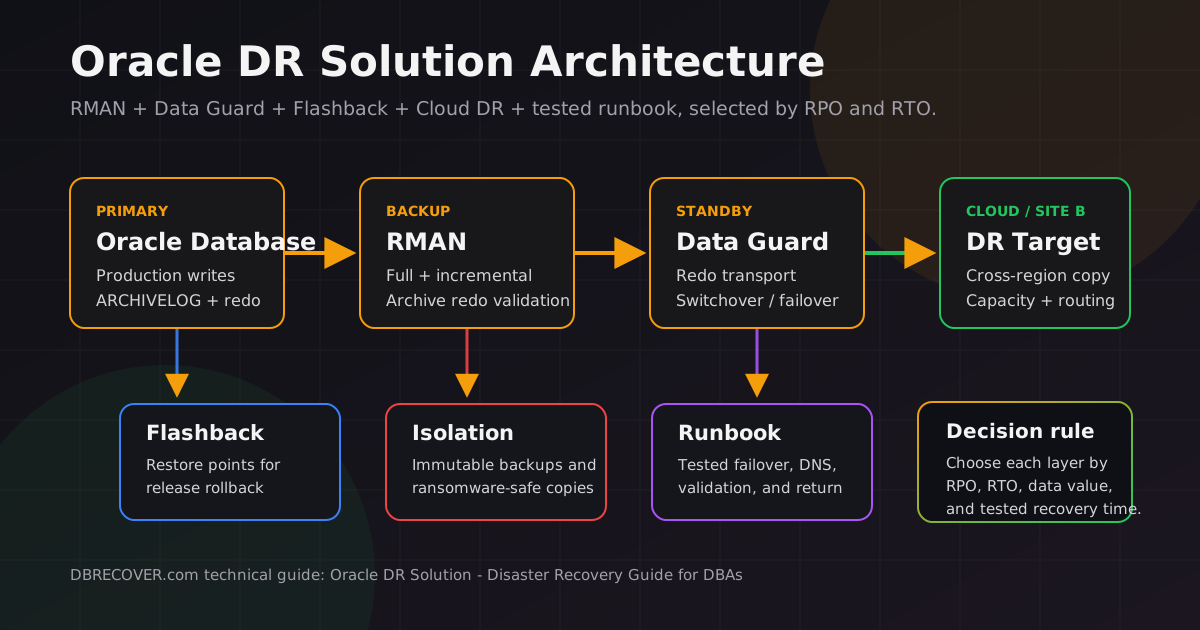
Recommended Oracle DR solution by RPO/RTO
For most production databases, the practical Oracle DR disaster recovery solution is a layered design: RMAN for recoverability, Data Guard for site-level continuity, Flashback for fast rewind, and a rehearsed runbook for role transition and application validation.
| Business target | Recommended Oracle DR design | Best fit |
|---|---|---|
| Hours of downtime acceptable | RMAN full/incremental backups, archived redo, off-host copies, and quarterly restore drills. | Development, reporting, smaller internal systems, and low-change workloads. |
| Recovery in minutes | Physical standby with Oracle Data Guard, broker validation, standby redo logs, and documented service failover. | Most line-of-business Oracle databases that cannot wait for a full restore. |
| Very low or zero data loss | Synchronous Data Guard design, validated network latency, Fast-Start Failover where appropriate, and tested application reconnect. | Financial, order-processing, healthcare, and regulated systems with strict RPO. |
| Fast rollback after user error | Flashback Database, guaranteed restore points, delayed standby, and point-in-time recovery procedures. | Release windows, batch processing, migration cutovers, and high-risk maintenance. |
| Ransomware resilience | Immutable backups, isolated or delayed copies, credential separation, forensic restore tests, and direct extraction as a last resort. | Any environment where attackers may reach online backup or standby infrastructure. |
Minimum foundation
Every production Oracle database needs ARCHIVELOG mode, RMAN backups, control file autobackup, archived redo retention, restore validation, and off-host copies.
Site-level DR
Oracle Data Guard is the standard architecture for primary and standby database protection when the goal is fast recovery after server, storage, data center, or regional failure.
Fast rewind
Flashback Database and guaranteed restore points are valuable for reversing many operator mistakes, failed deployments, and test changes when the datafiles remain intact.
Last resort
When backups are missing or unusable, direct datafile extraction may be the only practical option. It is a salvage technique, not a replacement for DR architecture.
This guide is intentionally educational first. It explains how Oracle disaster recovery works, how to choose an architecture, what to test, and where specialized recovery software such as DBRECOVER for Oracle fits when conventional recovery fails.
What Oracle DR Really Means
Oracle DR is the ability to restore service and data after the primary environment is lost, damaged, corrupted, isolated, or no longer trusted. High availability keeps a service running through expected component failures. Disaster recovery assumes the normal path may be gone and asks how the organization will resume from a different copy, site, region, or reconstructed dataset.
A complete Oracle disaster recovery solution has to answer five questions:
- What failed? Instance, server, storage, data center, region, human operation, data corruption, software bug, or ransomware.
- What is the last trusted point? Current primary, standby apply point, backup completion time, restore point SCN, exported data, or surviving datafile blocks.
- How much data can be lost? This is the recovery point objective, or RPO.
- How long can the service be unavailable? This is the recovery time objective, or RTO.
- Who executes the plan? DBAs, storage team, application owners, network engineers, security team, and executives must know their parts before a disaster.
A backup is a copy. A DR solution is the tested process that turns a copy into a working service under pressure. Many organizations have backups but no proven restore path, no clean credentials, no application endpoint plan, and no decision process for failover.
Failure types that matter for Oracle databases
| Failure type | Typical symptoms | Primary recovery tools | Key risk |
|---|---|---|---|
| Instance or node failure | Database instance crash, RAC node lost, service interruption | Oracle Restart, RAC, Clusterware, service relocation | Usually HA, not full DR, unless shared storage or site is lost |
| Media failure | Lost datafile, failed disk group, ORA-01157, ORA-01115 | RMAN restore and recover, Data Guard failover, ASM recovery | Requires valid backups or standby copies |
| Logical user error | Dropped table, bad batch update, wrong deployment | Flashback Query, Flashback Table, restore points, PITR, exports | Standby replication can faithfully replicate the mistake |
| Data corruption | ORA-01578, ORA-00600, DBVERIFY or RMAN validation errors | RMAN block media recovery, Data Guard automatic repair, clean backup, direct extraction | Need to identify whether corruption is physical, logical, or application-level |
| Site or region outage | Primary host or data center unreachable | Data Guard, cloud standby, DNS/service failover, restored backups | RTO depends on prebuilt standby and application routing |
| Ransomware or destructive attack | Encrypted DBF files, deleted backups, altered OS files, suspicious accounts | Immutable backups, isolated standby, forensics, restore, direct salvage of unaffected blocks | Do not trust the primary until scope and timeline are known |
RPO, RTO, and Recovery Tiers
RPO and RTO are the two numbers that keep an Oracle DR conversation honest. Without them, every architecture discussion becomes vague. With them, tradeoffs become explicit.
Recovery Point Objective
How much committed data the business can lose. It is measured in seconds, minutes, hours, or the last backup.
Recovery Time Objective
How long the application can be down before the impact becomes unacceptable.
Maximum Tolerable Downtime
The point where outage impact becomes existential, contractual, or legally material.
Practical Oracle recovery tiers
| Tier | Common architecture | Typical RPO | Typical RTO | Fit |
|---|---|---|---|---|
| Backup only | RMAN full/incremental backups plus archived redo | Last archived redo available | Hours to days | Low-cost systems, development, small databases, non-critical workloads |
| Warm standby | Restored copy refreshed by backup or delayed redo apply | Minutes to hours | Hours | Medium workloads where cost is constrained and manual recovery is acceptable |
| Data Guard physical standby | Primary ships redo to standby, Redo Apply keeps it synchronized | Seconds to minutes; potentially zero with synchronous design | Minutes, depending on failover automation and app routing | Most production Oracle DR requirements |
| Active Data Guard and broker | Readable physical standby, broker, Fast-Start Failover, optional Far Sync | Very low; zero-data-loss designs possible | Seconds to minutes after validation | Critical systems needing read offload, faster failover, and stronger automation |
| Logical replication | GoldenGate or logical standby for selected data and transformations | Seconds to minutes | Application dependent | Cross-platform, migration, reporting, active-active patterns, selective replication |
| Forensic salvage | Direct data extraction from DBF, ASM, dump, redo, or surviving blocks | Depends on surviving data | Case dependent | No valid backup, corrupted dictionary, damaged control file, ransomware, or failed restore |
Core Oracle DR Building Blocks
Oracle disaster recovery is layered. The strongest designs use several layers so that one failure mode does not defeat the whole plan.
ARCHIVELOG mode, FORCE LOGGING where appropriate, RMAN backups, archived redo, control file autobackup.
RMAN validate, restore drills, DBVERIFY, backup catalog checks, checksum and storage monitoring.
Data Guard physical standby, broker, standby redo logs, lag monitoring, role transition rehearsals.
Flashback Database, guaranteed restore points, delayed apply, point-in-time recovery, exports.
Application services, connection strings, DNS, secrets, security controls, incident runbooks.
RMAN
Recovery Manager is Oracle's native physical backup and recovery utility. It backs up datafiles, control files, server parameter files, and archived redo. It also supports incremental backups, block media recovery, compression, encryption, validation, duplication, and recovery catalogs. RMAN is the minimum foundation for any Oracle DR solution.
Data Guard
Oracle Data Guard creates and maintains standby databases. The primary database ships redo; the standby receives and applies it. If the primary is unavailable because of planned or unplanned outage, a standby can be promoted to the primary role. Oracle documentation describes Data Guard as a technology for high availability, data protection, and disaster recovery for enterprise data.
Flashback Database
Flashback Database is a rewind mechanism. Instead of restoring a full backup and rolling forward, Oracle uses flashback logs to move the database to a previous SCN or timestamp when prerequisites are met. This is powerful for deployment rollback and some user mistakes, but it is not a media failure repair tool.
GoldenGate and logical replication
Oracle GoldenGate is typically used for logical replication, migration, integration, and heterogeneous or active-active patterns. It can be part of a DR strategy, especially when selective data movement or cross-platform targets are required. It is not a simple substitute for a block-identical physical standby.
Storage snapshots
Storage snapshots can help when they are application-consistent, protected from attacker deletion, and tested for Oracle recovery. They should be treated as one layer, not the entire Oracle disaster recovery solution. A crash-consistent snapshot of a busy database may still require redo and careful recovery.
Direct data extraction
Direct extraction reads Oracle data structures from surviving files when the database cannot be opened. This is useful for severe cases such as missing SYSTEM tablespace, damaged control files, lost online redo, dictionary corruption, dropped files, or ransomware-damaged DBF files. It usually recovers data into a clean target database rather than repairing the damaged one in place.
Oracle DR Reference Architectures
The correct design depends on database size, change rate, acceptable data loss, network latency, licensing, operations team maturity, and the cost of downtime. The following patterns cover most real-world Oracle environments.
Backup-centric DR
Use RMAN full and incremental backups, archived redo, encrypted offsite copies, and regular restore testing. This is simple but may have longer RTO.
Physical standby DR
Use Data Guard with a remote physical standby. This gives strong protection for site loss and is the common enterprise Oracle DR architecture.
Low data loss DR
Use synchronous Data Guard protection modes, suitable network latency, standby redo logs, broker, and failover rehearsals.
Read offload plus DR
Use Active Data Guard when the standby must support read-only workloads, reporting, backups, or block repair features while still protecting the primary.
Hybrid cloud DR
Keep production on premises and maintain a standby in cloud, or run primary in cloud and standby elsewhere. Network, encryption, and operational access are central.
Logical DR or migration
Use GoldenGate when you need selected schemas, transformed data, cross-version movement, active-active patterns, or migration with minimal downtime.
Decision matrix
| Requirement | Usually prefer | Why | Watch out for |
|---|---|---|---|
| Recover from a single lost datafile | RMAN restore and recover | Purpose-built for media recovery when backups and redo exist | Archived redo gaps, lost control file metadata, backup encryption keys |
| Survive data center outage | Data Guard physical standby | Maintains a transactionally consistent remote copy | Network bandwidth, lag, application connection failover, standby capacity |
| Rollback failed deployment quickly | Flashback Database or guaranteed restore point | Rewinds changed blocks faster than full restore when prerequisites are met | FRA sizing, flashback limitations, NOLOGGING operations, dropped datafiles |
| Recover from accidental table delete | Flashback Table, Data Pump, tablespace PITR, delayed standby | Targets logical mistake without replacing the whole database | Undo retention, constraints, dependent objects, application consistency |
| Protect against ransomware | Immutable backups, isolated copies, delayed apply, clean standby, forensics | Attackers often target connected backups and replication paths | Credential reuse, backup deletion, encrypted standby files, untrusted restore points |
| Recover with no valid backup | Direct DBF or ASM data extraction | Reads surviving Oracle blocks and exports recoverable table data | Incomplete files, lost dictionary, encrypted tablespaces, LOB damage, data consistency |
Data Guard Design Checklist
Data Guard is usually the center of an Oracle DR solution for production systems because it addresses both data protection and service recovery. The core mechanics are redo transport, redo apply, and role transition.
A basic Data Guard design starts with one primary database and at least one standby. The standby can be physical, logical, or snapshot, but physical standby is the standard choice for disaster recovery because it is block-for-block aligned with the primary. The Data Guard broker adds centralized management and simplifies switchover and failover operations.
Data Guard protection modes
| Mode | Behavior | Use when |
|---|---|---|
| Maximum Performance | Asynchronous redo transport. Primary performance is prioritized. | The business accepts small data loss risk for lower latency impact. |
| Maximum Availability | Synchronous protection when possible, with fallback behavior to preserve primary availability. | You need strong data protection but cannot let standby issues stop production indefinitely. |
| Maximum Protection | Designed to prevent data loss; primary may stop if redo cannot be written to a synchronized standby. | Zero data loss is mandatory and the application can accept the availability tradeoff. |
Pre-implementation checklist
- Confirm Oracle edition, options, support status, and licensing for Data Guard, Active Data Guard, RAC, and any cloud automation.
- Measure redo generation during peak business periods, not only average daily volume.
- Size network bandwidth and latency for redo transport, especially if synchronous transport is required.
- Enable ARCHIVELOG mode and consider FORCE LOGGING for workloads where unrecoverable operations would defeat standby consistency.
- Create standby redo logs with correct size and count for each thread, including RAC threads.
- Use unique database names and stable Oracle Net service names for primary and standby roles.
- Protect password files, wallets, TDE keys, backup encryption keys, and broker configuration files.
- Document how clients reconnect after switchover or failover: services, SCAN, DNS, load balancer, connection strings, and secrets.
Minimal broker-oriented operational commands
The exact commands depend on your version and topology, but a Data Guard broker workflow usually includes validation, monitoring, switchover testing, and failover rehearsals in a non-production environment.
-- DGMGRL examples, adapt names and credentials to your environment.
DGMGRL> SHOW CONFIGURATION;
DGMGRL> SHOW DATABASE VERBOSE primary_db;
DGMGRL> SHOW DATABASE VERBOSE standby_db;
DGMGRL> VALIDATE DATABASE primary_db;
DGMGRL> VALIDATE DATABASE standby_db;

-- Planned role transition.
DGMGRL> SWITCHOVER TO standby_db;

-- Emergency role transition. Use only after business decision and failure confirmation.
DGMGRL> FAILOVER TO standby_db;
Monitoring queries
-- Primary or standby role and protection mode.
SELECT name, database_role, open_mode, protection_mode, protection_level
FROM v$database;

-- Standby transport and apply lag.
SELECT name, value, unit, time_computed
FROM v$dataguard_stats
WHERE name IN ('transport lag', 'apply lag', 'apply finish time');

-- Archive destinations and errors.
SELECT dest_id, status, error, destination, target, schedule
FROM v$archive_dest_status
ORDER BY dest_id;A delayed standby can protect against some human errors or malicious changes because redo is intentionally applied later. The tradeoff is that it is not your fastest failover target. Many mature environments use more than one standby: one current standby for fast failover and one delayed or isolated copy for logical error recovery.
RMAN Backup and Restore Foundation
RMAN remains mandatory even when Data Guard exists. A standby database is not a historical archive. It can be affected by propagated mistakes, storage corruption, credential compromise, or operational errors. RMAN gives you time depth, retention policy, validation, and independent restore paths.
Baseline RMAN configuration
RMAN> SHOW ALL;
RMAN> CONFIGURE CONTROLFILE AUTOBACKUP ON;
RMAN> CONFIGURE RETENTION POLICY TO RECOVERY WINDOW OF 14 DAYS;
RMAN> CONFIGURE BACKUP OPTIMIZATION ON;
RMAN> CONFIGURE DEVICE TYPE DISK PARALLELISM 4 BACKUP TYPE TO COMPRESSED BACKUPSET;
Backup, validate, and restore test
-- Routine online backup.
RUN {
  BACKUP AS COMPRESSED BACKUPSET DATABASE PLUS ARCHIVELOG;
  BACKUP CURRENT CONTROLFILE;
}

-- Validate database files and backups.
RMAN> VALIDATE DATABASE;
RMAN> RESTORE DATABASE VALIDATE;
RMAN> RESTORE ARCHIVELOG ALL VALIDATE;

-- Maintenance.
RMAN> CROSSCHECK BACKUP;
RMAN> REPORT OBSOLETE;
RMAN> DELETE NOPROMPT OBSOLETE;
What to store away from the primary
- RMAN backup pieces and image copies.
- Archived redo logs needed for point-in-time recovery.
- Control file autobackups and SPFILE backups.
- RMAN catalog database backups if you use a catalog.
- TDE wallets, keystores, backup encryption passwords, and recovery credentials.
- Versioned restore scripts, network configuration, parameter files, and runbooks.
Validation commands are useful, but they do not replace a full restore drill to separate infrastructure. Test the whole path: retrieve backup, decrypt, restore control file, mount, catalog backup pieces if needed, restore, recover, open, run application checks, and record timings.
Flashback and Restore Points
Flashback Database is often the fastest way to reverse a bad deployment, failed upgrade, data load mistake, or other unwanted changes when the underlying files still exist and flashback logs are available. Oracle SQL reference describes FLASHBACK DATABASE as a way to return a database to a past time or SCN and as a fast alternative to incomplete database recovery.
Enable Flashback Database
-- Example only. Size the fast recovery area before enabling this.
ALTER SYSTEM SET db_recovery_file_dest_size = 500G SCOPE=BOTH;
ALTER SYSTEM SET db_recovery_file_dest = '/u03/fra' SCOPE=BOTH;

SHUTDOWN IMMEDIATE;
STARTUP MOUNT;
ALTER DATABASE ARCHIVELOG;
ALTER DATABASE FLASHBACK ON;
ALTER DATABASE OPEN;
Create a guaranteed restore point before risky work
CREATE RESTORE POINT before_release_2026q2 GUARANTEE FLASHBACK DATABASE;

-- If rollback is required:
SHUTDOWN IMMEDIATE;
STARTUP MOUNT;
FLASHBACK DATABASE TO RESTORE POINT before_release_2026q2;
ALTER DATABASE OPEN RESETLOGS;
Flashback limitations to remember
- Flashback Database must be configured before the incident unless you are using a guaranteed restore point path that supports your scenario.
- It does not repair media failure or recover an accidentally deleted datafile by itself.
- Fast Recovery Area sizing controls how much flashback history you can retain.
- NOLOGGING operations can create recovery surprises; protect critical workloads with LOGGING where appropriate.
- Control file restore or recreation can discard flashback log information needed for rewind.
Cloud and Hybrid Oracle DR
Cloud does not remove DR design work. It changes where you place capacity, how you connect networks, how you secure keys, and how quickly you can promote an alternate environment.
A common hybrid pattern is primary on premises with a standby database in cloud. Another pattern is a primary database in one cloud region with Data Guard in another region. For less critical systems, you may store RMAN backups in object storage and build the database only when needed. Each pattern has different cost and recovery characteristics.
Hybrid Data Guard considerations
- Latency: Synchronous zero-data-loss designs require low round-trip time. Asynchronous transport tolerates more latency but increases potential data loss.
- Bandwidth: Peak redo generation determines required throughput. Batch jobs, index rebuilds, and ETL windows often produce more redo than expected.
- Encryption: TDE wallets, keystores, and backup encryption keys must be available at the DR site without exposing them broadly.
- Network routing: Plan client cutover, listener configuration, SCAN, DNS TTL, firewalls, and security groups before failover.
- Capacity: A standby that is undersized may protect data but fail to support production load after promotion.
- Automation: Cloud console automation is helpful, but DBAs still need tested manual procedures for degraded conditions.
When backup-to-cloud is enough
Backup-to-cloud can be a reasonable Oracle disaster recovery solution for lower-tier systems if the business accepts restore time. It is not enough for systems where the database must resume in minutes, where data loss must be near zero, or where network retrieval of many terabytes would exceed the outage budget.
Ransomware and Corruption Response
Ransomware changes the DR problem because the primary database may not simply be unavailable. It may be untrusted. Backups may have been deleted. Standby databases may have applied malicious changes. Credentials, wallets, scripts, and monitoring systems may be compromised.
Immediate response principles
- Stop writes and isolate evidence. Avoid actions that overwrite surviving blocks, logs, or metadata.
- Preserve copies before repair attempts. Image disks, copy DBF files, save alert logs, listener logs, audit logs, wallet directories, and backup catalogs.
- Identify the last trusted point. Compare backup times, redo timelines, standby apply lag, suspicious sessions, and file modification times.
- Restore into isolation first. Do not connect a restored database to production applications until scope is known.
- Rotate secrets. Database, OS, backup, cloud, TDE, monitoring, and application credentials may all be in scope.
Corruption-specific recovery paths
| Scenario | Try first | If that fails |
|---|---|---|
| Small number of corrupt blocks | RMAN RECOVER BLOCK, Data Guard automatic block repair if available |
Object-level export from good copy, table rebuild, direct block-level extraction |
| Lost or corrupt SYSTEM tablespace | Restore and recover from RMAN backup | Data extraction from user tablespaces into clean database |
| Missing archived logs | Find logs on standby, FRA, backup media, or old hosts | Incomplete recovery, standby activation at available SCN, table-level salvage |
| Encrypted or partially overwritten DBF files | Restore clean backup and validate with application checks | Scan for remaining plaintext Oracle blocks and recover partial table data |
| Dropped or truncated table without useful flashback | Tablespace PITR, delayed standby, export from backup clone | Direct datafile scan if old extents still exist and were not overwritten |
DBRECOVER for Oracle is useful when conventional Oracle recovery cannot open the database or when no trustworthy backup exists. It can help inspect and extract recoverable data from damaged Oracle datafiles, ASM copies, and severe recovery cases. It should be treated as a last-resort salvage layer after, not instead of, RMAN, Data Guard, and immutable backup design.
Testing and Runbook Design
The most common DR failure is not technology. It is an untested plan. A useful Oracle DR runbook must be specific enough that an on-call DBA can execute it at 03:00, while still leaving room for incident commander decisions.
Minimum quarterly DR test
- Restore the latest RMAN backup to an isolated host.
- Recover to current time or a selected SCN using archived redo.
- Open the database and run data dictionary, invalid object, and application smoke checks.
- Measure restore time, recover time, post-open repair time, and application validation time.
- Run a Data Guard switchover in a controlled window and then switch back.
- Test failover in non-production, including client reconnection and service relocation.
- Verify that backup encryption keys, wallets, passwords, and scripts are accessible through the approved break-glass process.
- Record every manual command, delay, missing permission, and dependency.
Runbook skeleton
| Section | What it must contain |
|---|---|
| Decision authority | Who can declare disaster, approve failover, accept data loss, and communicate externally. |
| Environment map | Primary, standby, backup repositories, wallets, DNS, load balancers, monitoring, and dependencies. |
| Health checks | Queries and commands to confirm primary loss, standby lag, backup validity, and last trusted SCN. |
| Failover path | Broker commands, manual SQL fallback, service start, application reconnection, validation checks. |
| Restore path | Backup discovery, control file restore, cataloging, restore, recover, open RESETLOGS, validation. |
| Security path | Credential rotation, wallet handling, forensic preservation, isolation rules, privileged access logs. |
| Return path | Reinstate or rebuild old primary, resynchronize Data Guard, switch back if required, and close incident findings. |
Common mistakes
- Assuming storage replication is the same as database consistency.
- Using Data Guard but never testing application reconnection after role transition.
- Keeping all backups online with the same administrative credentials used by production.
- Not backing up the control file, SPFILE, TDE wallet, and recovery catalog.
- Forgetting that NOLOGGING operations can break recovery expectations.
- Letting archived logs age out before backups are secured and validated.
- Testing restore only on tiny databases, then assuming a multi-terabyte production restore will meet the same RTO.
- Failing to define who can accept data loss during emergency failover.
How to Position DBRECOVER in an Oracle DR Strategy
DBRECOVER is best understood as a recovery safety net, not as the primary Oracle DR solution. The primary solution should still be RMAN, Data Guard, Flashback, security controls, and a tested runbook. However, real incidents often arrive in worse condition than the runbook assumed.
DBRECOVER becomes relevant when:
- The database cannot mount or open, but DBF files still exist.
- Backups are missing, stale, encrypted, incomplete, or fail during restore.
- Control files, SYSTEM tablespace, dictionary metadata, or redo logs are damaged.
- Ransomware encrypted some files but left recoverable plaintext Oracle blocks in others.
- The business needs table-level salvage into a clean database instead of in-place repair.
For planned DR architecture, start with Oracle-native protection. For emergency salvage, evaluate whether direct extraction can recover enough critical data to reduce business loss. The DBRECOVER trial can help verify recoverability before a purchase decision.
FAQ
What is the best Oracle DR disaster recovery solution?
The best Oracle DR solution depends on RPO, RTO, cost, database size, change rate, topology, and operational maturity. For many production databases, the practical answer is RMAN backups plus Oracle Data Guard, with Flashback Database for fast rewind and a tested failover runbook. For lower-tier systems, RMAN plus offsite backups may be enough. For no-backup emergencies, direct data extraction is a salvage path.
Is Oracle Data Guard enough for disaster recovery?
Data Guard is often the core of Oracle database disaster recovery, but it is not enough by itself. You still need RMAN backups, archived redo retention, restore validation, application failover, credential recovery, monitoring, and security isolation. Data Guard protects a current copy; backups protect history.
What is the difference between HA and DR in Oracle?
High availability reduces downtime from local component failures such as instance, node, or service failure. Disaster recovery handles broader loss or untrusted state, such as storage failure, site outage, region outage, ransomware, or major corruption. RAC is commonly HA. Data Guard is commonly DR. RMAN supports both recovery and DR.
How often should Oracle DR be tested?
Critical systems should test at least quarterly and after major infrastructure, version, network, security, or application changes. Less critical systems may test semi-annually, but every production database should have at least one full restore test per year. Switchover tests should be routine, not exceptional.
Can Flashback Database replace backups?
No. Flashback Database is a rewind feature, not a backup strategy. It depends on flashback logs, Fast Recovery Area sizing, and intact datafiles. It cannot replace off-host backups, archived redo, or restore testing.
How do I protect Oracle backups from ransomware?
Keep immutable or offline copies, separate backup credentials from production administrators, monitor backup deletion, protect wallets and keys, use object lock or equivalent controls where available, and regularly restore into an isolated environment. A connected backup repository with shared credentials is a high-risk target.
Further Reading
Oracle features and licensing change across releases. Use the documentation for your exact Oracle Database version before finalizing a production design.
- Oracle Data Guard Concepts and Administration: Introduction to Oracle Data Guard
- Oracle Database Backup and Recovery User's Guide: Introduction to Backup and Recovery
- Oracle SQL Language Reference: FLASHBACK DATABASE
- Oracle Backup and Recovery User's Guide: Flashback Database and Restore Points
- Oracle Maximum Availability Architecture in Oracle Cloud Infrastructure